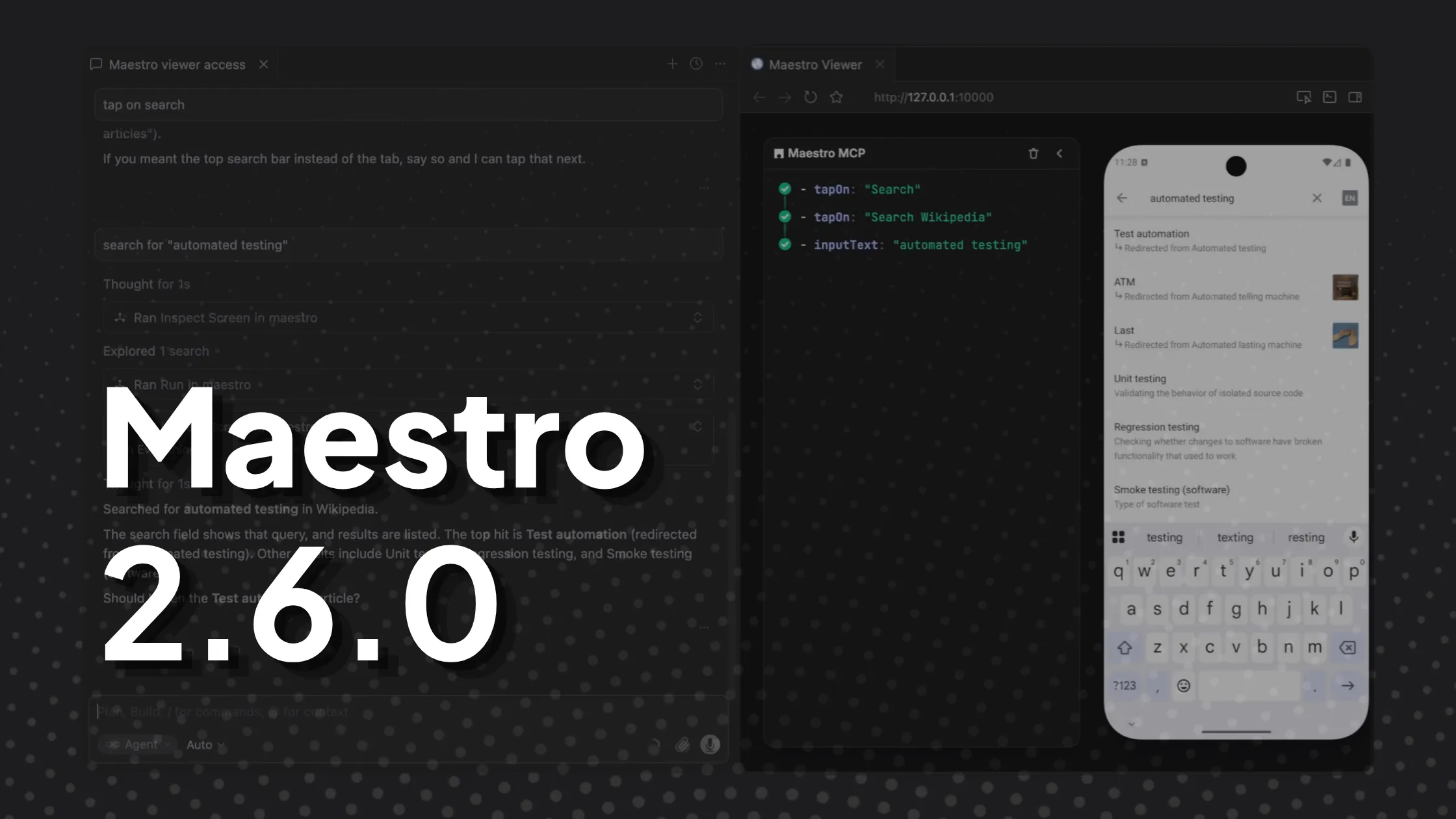
Maestro CLI v2.6.0 is out. Leading the release is Maestro Viewer: your AI coding agent now has a mobile device. Open the Maestro Viewer while your agent builds a mobile feature, or while it runs your Maestro tests. Watch every step and interact with the app live, right inside the agent. Plus: faster local iOS execution, cleaner output, and a handful of fixes.
Maestro Viewer
Maestro MCP now ships with Maestro Viewer: a web app that embeds an iOS simulator, Android emulator, or physical device directly in your coding agent or browser. It shows the exact commands Maestro MCP runs in real time, and lets you interact with the embedded device, so you can iterate end-to-end completely within the coding agent app of your choice.
How to open it
The Viewer is exposed via the open_maestro_viewer MCP tool. To open it, ask your coding agent:
open the maestro viewer
The Viewer requires an AI coding agent with Maestro MCP installed.
Not on MCP yet? Follow the setup guide to connect Maestro MCP to your coding agent.
Parallel iOS simulator execution
Running multiple maestro test processes against different iOS simulators on the same machine was unreliable. v2.6.0 adds per-device session tracking, cross-process file locking, a port-availability check, and the new --driver-host-port flag, so concurrent local iOS runs now work.
Studio bundled in the CLI is gone
The web-based Maestro Studio that shipped inside the CLI has been removed. It was a different product from the Maestro Studio desktop app, and we deprecated it a while back. To visualize what’s happening during a test, you now have two supported paths: run Maestro Viewer (inside your AI coding agent), or use the standalone Maestro Studio desktop app.
Rhino JS engine removed
The Rhino JavaScript engine has been fully removed from Maestro. It had already been deprecated in favor of GraalJS, which is now the only engine used to execute evalScript and runScript blocks.
Quality of life
Better YAML parsing errors. Parse and validation errors now pinpoint the exact line and column (caret accuracy fixed), with output reformatted to render cleanly across the CLI and Maestro Studio.
Cleaner paths in CLI and Cloud output. Step descriptions (the lines Maestro prints as it executes each step) and error messages now show clean relative paths instead of full absolute paths. The format is consistent across the CLI and Maestro Cloud.
iOS XCTest logs in the debug output directory. When an iOS test fails, XCTest logs (previously stored separately by Xcode in DerivedData) are now bundled into Maestro’s debug output. One folder, everything you need.
maestro hierarchy output is now pure JSON. No more mixed human-readable headers in the output. Pipe it straight to jq or into a script.
Faster cancellation of in-flight screenshots. Hitting Ctrl+C while a screenshot is being captured no longer delays cleanup.
Skip redundant device reads after read-only commands. Maestro used to re-read the device’s UI hierarchy after every command. For read-only commands like assertVisible, assertNotVisible, and assertTrue, the screen has not changed, so the re-read was wasted work. We skip it now. Flows with many assertions run faster.
Reports & MCP
Cloud URL and app binary ID in the HTML report. The HTML report now includes a link back to the corresponding Maestro Cloud run, plus the app binary ID identifying the specific build that was tested. Easier to audit which build produced which result.
JUnit XML improvements. The JUnit output now includes a file attribute (which YAML produced the result), and id and classname are configurable. CI dashboards and test analytics tools (Datadog, Buildkite, and others) can group and filter Maestro results by file and classname.
MCP cheat_sheet works without Cloud auth. The cheat_sheet MCP tool, which returns Maestro command docs to your AI agent, no longer requires Cloud authentication.
MCP take_screenshot downscales large screenshots. The take_screenshot MCP tool now downscales screenshots before sending the image to your agent. Avoids LLM image-token limits and reduces wasted tokens.
Notable fixes
assertScreenshot match percent now aligns with the configured threshold. The match percentage in the error message used a different scale than the configured threshold, so a result like “match: 96%” could fail under a 5% threshold. The two now use the same scale. Behavior is predictable.
Fixed empty Android WebView hierarchies in devtools mode. When using androidWebViewHierarchy: devtools, Maestro was returning an empty WebView hierarchy, so elements inside Android WebViews could not be found or tapped (commands failed with “element not found” even when the element was visible). WebView inspection works again. This was a regression since the April release.
Helpful errors for invalid timeouts and null env values. Error messages now explain what went wrong in plain language (for example, timeout must be a positive integer, got -5, or environment variable FOO was referenced but is null/empty) instead of generic stack traces.
Deprecations
--android-api-level and --ios-version are being phased out in favor of --device-os. v2.6.0 emits a deprecation warning when either flag is used, pointing to the replacement. Migrate before they are removed in a future release.