

- Maestro: Simple YAML-based tests, fast execution, and low setup complexity. Great for teams new to automation.
- Appium: Works across multiple platforms and languages but can be slow and complex to set up.
- Espresso: Fast and stable for Android-only testing with automatic UI synchronization.
- Detox: Ideal for React Native apps, with built-in synchronization to reduce flaky tests but has a steep setup process.
Quick Comparison
| Framework | Platforms | Test Language | Stability Features | Setup Complexity | Speed |
|---|---|---|---|---|---|
| Maestro | Android, iOS | YAML | Built-in stability logic | Low | Fast |
| Appium | Android, iOS, more | Multi-language | Locator strategy options | High | Slower |
| Espresso | Android only | Java, Kotlin | Automatic UI sync | Moderate | Very Fast |
| Detox | Android, iOS (React Native) | JavaScript, TypeScript | Smart sync model | High | Fast |
Choose based on your app's platform, team's expertise, and testing needs. Each framework has its strengths - whether it's speed, flexibility, or ease of use.
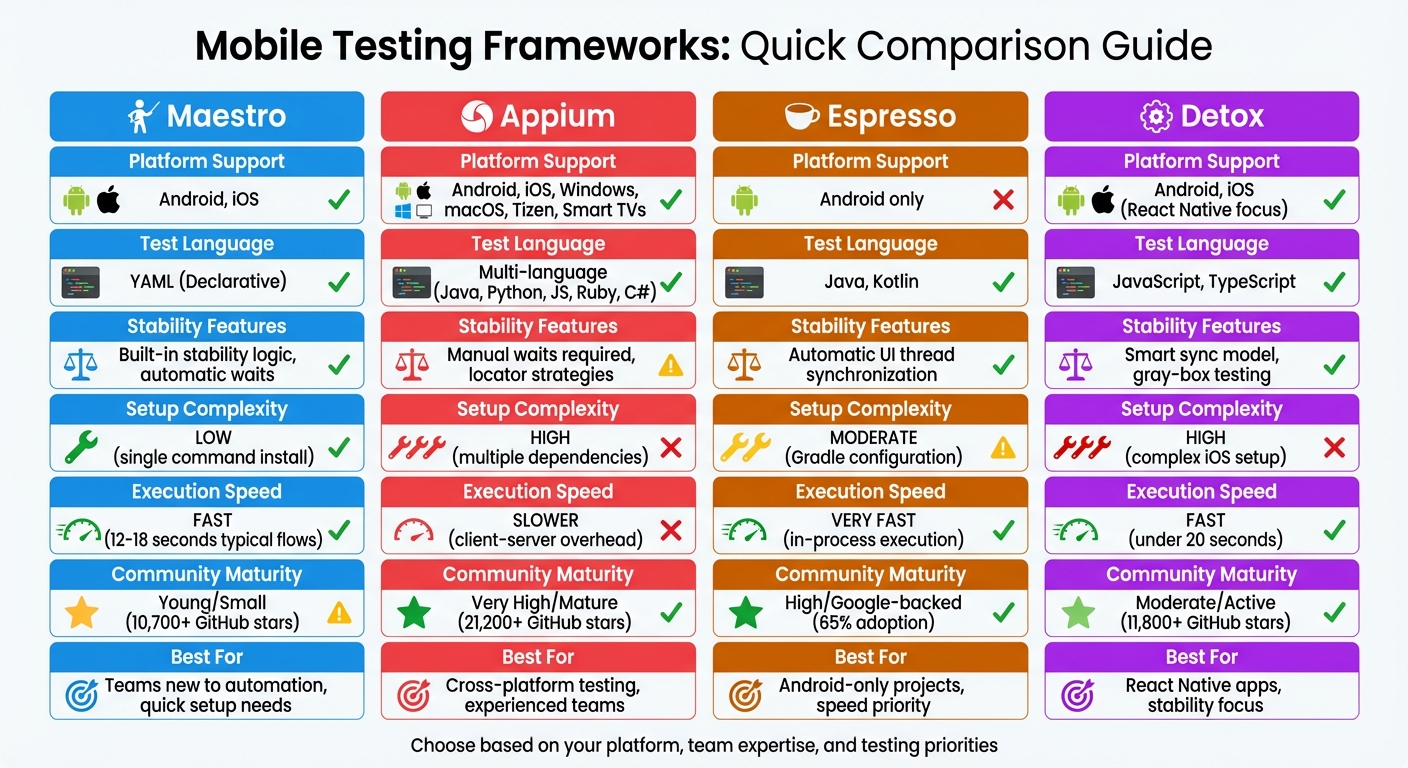
Mobile Testing Frameworks Comparison: Maestro vs Appium vs Espresso vs Detox
Mobile Test Automation Tools for 2024 and beyond
sbb-itb-e343f3a
1. Maestro
Maestro stands out in the mobile testing world by prioritizing simplicity and speed. Released in July 2022, it builds on lessons from earlier frameworks while cutting out unnecessary complexity.
Platform Support
Maestro supports Android (physical devices and emulators) and iOS (simulators), along with functional capabilities for web applications. Its framework-agnostic design means it works seamlessly with apps built using Swift, Kotlin, React Native, Flutter, or hybrid stacks like .NET MAUI. With direct UI interaction, test flows can be reused across both Android and iOS platforms. Companies like Microsoft and DoorDash rely on Maestro for large-scale automation.
Test Syntax
Maestro's test syntax is designed to be simple and approachable. Tests are written in YAML using intuitive commands like tapOn, inputText, and assertVisible. This allows users to get started without needing advanced programming skills. For more complex scenarios, Maestro supports JavaScript injection. According to its documentation:
"Maestro makes UI testing dead simple. Write your first test in under 5 minutes."
To make things even easier, Maestro offers Maestro Studio - a free desktop IDE that helps you generate YAML test flows by inspecting elements and inserting commands as you interact with your app. This tool eliminates the need for manual coding while supporting Maestro's reliability features, which are covered in the next section.
Flakiness Handling
One of Maestro's standout features is its ability to handle flakiness effectively. It automatically waits for UI elements to appear and become interactive, eliminating the need for manual sleep calls. Using a black-box polling mechanism, it checks for UI elements for up to 17 seconds. When tapping, it compares screenshots pixel-by-pixel and retries if less than 0.5% of the screen changes. Additionally, it waits up to 2 seconds for the UI to settle after each interaction.
The Todoist Android team saw major improvements after migrating 63 core workflow tests to Maestro in early 2025. Previously, only 50% of their test runs passed on the first attempt, but with Maestro, they achieved over 99% reliability. Execution time dropped from 80 minutes to under 20 minutes - a 4× speed boost - thanks to a migration completed by nine team members in just four days.
"Maestro eliminates the maintenance burden through a fundamentally different architecture... it doesn't care how the UI is updated, only that it is updated." – Doist Engineering
Setup Complexity
Installing Maestro is straightforward, especially on macOS and Linux. A single command gets you started:
curl -Ls "https://get.maestro.mobile.dev" | bash
Maestro runs as a single binary, requiring no intermediate servers or complicated setup. However, you’ll need Java 17, and for Android testing, the Android SDK and Android Studio are required. iOS testing needs Xcode and the Facebook IDB tool (idb-companion). Windows users face a slightly more involved process, as they need to set up Windows Subsystem for Linux (WSL). Currently, Maestro officially supports iOS simulators. Physical iOS device support is not natively available, though third-party community solutions exist.
Execution Speed
Maestro’s interpreted tests provide near-instant feedback during development. Benchmarks show it can execute typical checkout flows in just 12–18 seconds. For CI/CD pipelines, Maestro Cloud offers parallel execution, cutting total runtime by up to 90%. However, flows in the cloud are limited to a 15-minute timeout (soft limit).
Community Maturity
As an open-source tool licensed under Apache-2.0, Maestro has built a strong community. It has gained significant community traction with over 10,000 stars on GitHub (as of early 2025), along with active documentation, tutorials, and plugins. These resources help teams reduce flakiness to below 1%.
"The learning curve is measured in hours, not weeks. New team members write their first working test on day one." – Meghna Sen, Panto AI
Maestro Cloud
Maestro offers its own cloud service for parallel test execution. Maestro Cloud runs tests on real devices and simulators in the cloud with up to 90% reduction in total runtime through parallel execution. It integrates seamlessly with CI/CD pipelines and provides detailed reporting, video recordings, and debugging tools.
2. Appium
Appium, an open-source tool, has gained widespread popularity for its ability to support multiple platforms. By February 2026, it had earned over 21,200 stars and 6,300 forks on GitHub.
Platform Support
Appium works across a variety of platforms, including iOS, Android, Windows, macOS, Tizen, and even smart TVs like Roku, tvOS, Android TV, Samsung, and WebOS. It supports testing for native, hybrid, and mobile web applications. To achieve this, Appium uses platform-specific drivers - like XCUITest for iOS and UiAutomator2 for Android - that convert standard WebDriver commands into native automation actions. This design enables teams to reuse up to 70% of their code between iOS and Android test cases.
"Appium opens up the possibility of true cross-platform native app automation, for mobile and beyond!" – Appium Documentation
Test Syntax
Appium’s flexibility lies in its language-agnostic approach, allowing developers to write tests in Java, Python, JavaScript, Ruby, or C#. It implements the W3C WebDriver protocol as its core API, which is HTTP-based. This means any programming language capable of making HTTP requests can interact with the Appium server, while lightweight client libraries translate language-specific commands into HTTP requests.
"Investing in the WebDriver protocol means you are betting on a single, free, and open protocol for testing that has become a web standard." – Appium Documentation
To simplify test creation, Appium includes Appium Inspector, a graphical interface that lets testers inspect app hierarchies and view screenshots. These tools, combined with its syntax and architecture, aim to streamline the development process.
Flakiness Handling
Appium’s reliance on external observation of the UI - rather than syncing with an app’s internal state - can lead to test flakiness. For example, it doesn’t automatically detect when animations finish or network calls complete. To address this, Appium offers a Universal XML plugin that standardizes element definitions across iOS and Android, reducing the need for constant updates. Using Accessibility IDs instead of XPath is also recommended to improve locator stability. However, these challenges can be exacerbated during setup and configuration.
Setup Complexity
Setting up Appium involves multiple steps. You’ll need Node.js, the Appium server, and platform-specific drivers. For Android testing, the Android SDK and Android Studio are required, while iOS testing requires Xcode. These dependencies can sometimes conflict, making the setup process tricky. Additionally, mastering advanced gestures and locator strategies adds to the learning curve.
Execution Speed
Appium’s client-server architecture introduces some latency. Each test command is sent as an HTTP request from the client to the Appium server, which then communicates with the device - this back-and-forth adds overhead. To speed things up, teams often use emulators for initial tests and rely on cloud-based real device labs to address device fragmentation.
Community Maturity
Appium benefits from a large, active community and extensive documentation. Its modular ecosystem, which includes third-party drivers and plugins managed via CLI, offers additional flexibility. Appium’s ability to integrate with modern CI/CD workflows makes it a solid choice for scalable mobile test automation.
3. Espresso
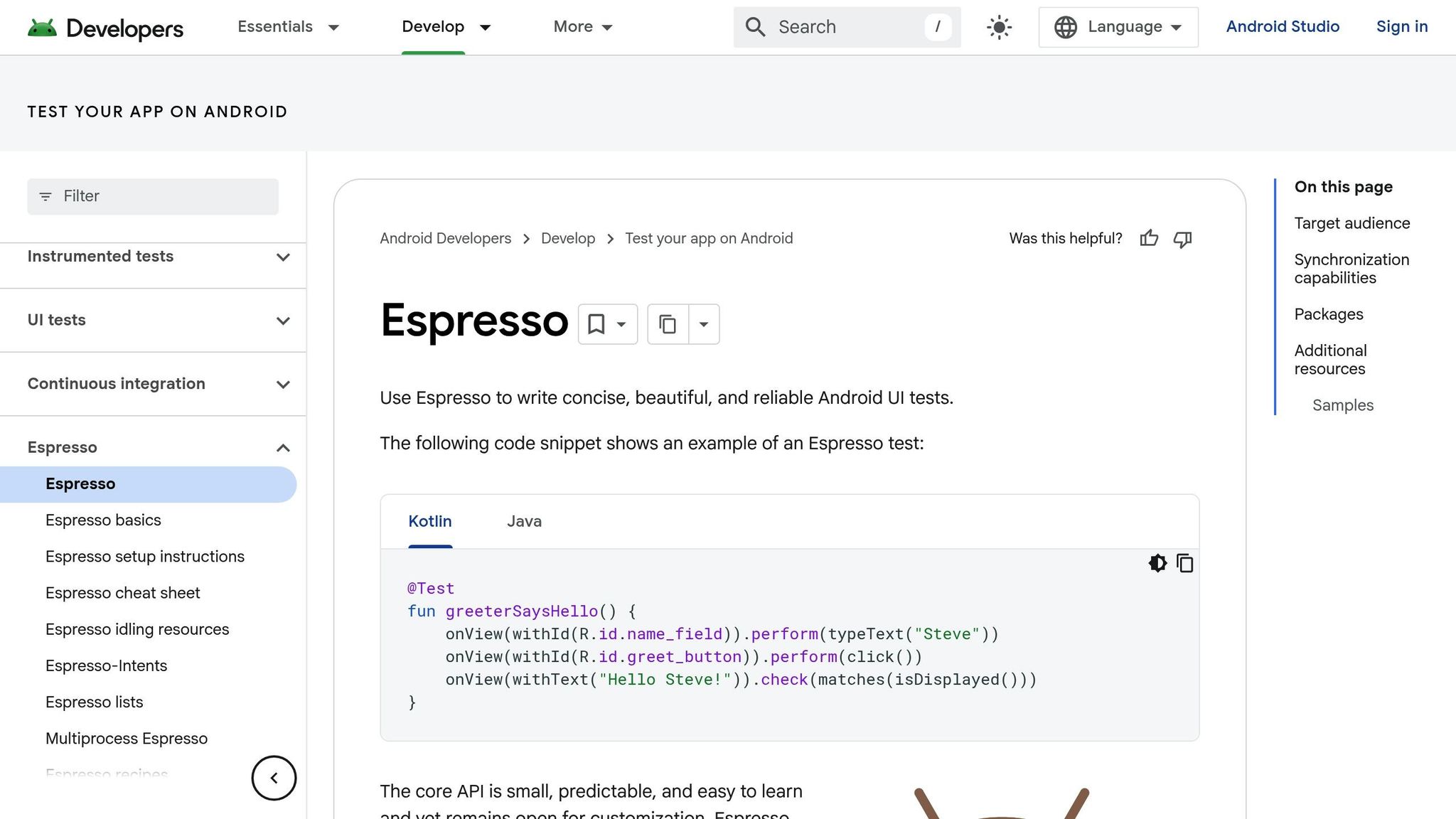
Espresso, developed by Google, is the official testing framework tailored specifically for Android applications. It supports devices running Android 2.3.3 (API level 10) and above and is trusted by over 50,000 teams worldwide. As part of the AndroidX and Android Jetpack suite, Espresso integrates seamlessly into the Android ecosystem, making it a go-to choice for native Android UI automation.
Platform Support
Espresso is designed exclusively for Android. It operates as an instrumentation API, requiring a complete Android environment - this includes the operating system, along with either a physical device or an emulator. Espresso uses two APKs: the app under test and a separate instrumentation test APK. Both run in the same process, allowing direct access to the app's internal code. This "white-box" testing approach ensures deeper validation.
Test Syntax
Espresso follows a straightforward "Find–Perform–Assert" workflow. Tests are written in Java or Kotlin, leveraging tools like ViewMatchers, ViewActions, and ViewAssertions to locate UI elements, perform interactions, and verify conditions. Integrated with Android Studio, it allows developers to reference UI components directly through the app's R file. Additionally, the Espresso Test Recorder in Android Studio can automatically generate test code based on manual interactions.
"Espresso tests run optimally fast! It lets you leave your waits, syncs, sleeps, and polls behind while it manipulates and asserts on the application UI when it is at rest." – Android Developers
Flakiness Handling
One of Espresso's standout features is its ability to automatically synchronize with the UI thread. It ensures that tests only run when the app is idle - waiting for the message queue to clear, all AsyncTasks to complete, and IdlingResources to be idle. This eliminates the need for manual waits or Thread.sleep() calls. For asynchronous tasks, developers can implement Idling Resources to maintain synchronization. To further minimize test flakiness, it's recommended to disable system animations (window, transition, and animator durations) in the developer options of your test devices [43, 44, 45].
Setup Complexity
Setting up Espresso is relatively simple. Add the necessary dependencies in your Gradle file and configure the testInstrumentationRunner. Developers familiar with Java or Kotlin will find the learning curve manageable, though understanding key components like ViewMatchers and IdlingResources is essential for effective test writing.
Execution Speed
Espresso is known for its speed. Since tests run within the same process as the app and utilize native synchronization, there's no client-server communication overhead. In a performance comparison, Espresso completed tests in half the time of XCUITest and one-eighth the time of other tools. This makes it particularly efficient for handling large test suites.
Community Maturity
As Google's official Android testing framework, Espresso enjoys robust documentation and widespread usage. A 2020 survey revealed that over 65% of Android development teams were using Espresso. Regular updates through Android Jetpack and its seamless integration with Android Studio and Gradle make it a reliable choice for modern CI/CD workflows. Up next, we’ll dive into another framework designed to streamline mobile test automation.
4. Detox
Detox is an open-source framework designed for end-to-end testing of React Native applications, though it also supports native components. Created and maintained by Wix, Detox has gained popularity within the mobile development community, boasting over 11,800 stars and 1,900 forks on GitHub. As of May 2023, it was downloaded approximately 176,000 times weekly on npm.
Platform Support
Detox works on both iOS and Android, but with some limitations. On Android, tests can run on both emulators and physical devices. For iOS, however, testing is restricted to simulators - real devices are not yet supported. Despite this, developers can write a single test suite in JavaScript or TypeScript that runs seamlessly on both platforms. By using native drivers, the framework handles platform-specific nuances internally, offering a unified API for testers. Detox officially supports React Native versions from v0.77.x to v0.83.x.
Test Syntax
Detox simplifies test creation for React Native apps by standardizing the syntax across platforms. Tests are written in JavaScript or TypeScript using async/await and executed with Jest. The process is fairly straightforward: select elements, perform actions, and verify results. To make tests resilient to UI updates, the by.id selector (tied to testID in React Native) is recommended. Additionally, adopting the Page Object Model can make tests easier to maintain.
Flakiness Handling
Unlike traditional black-box tools, Detox uses a gray-box testing approach, which means it understands the app's internal state and asynchronous processes. It automatically tracks network requests, animations, UI changes, and other operations, ensuring test actions happen only when the app is stable. This eliminates the need for manual sleeps or wait commands, which often lead to flaky tests.
"Detox eliminates the need for that malpractice [manual sleeps], and so introduces stability into the otherwise inherently-flaky test world." – Detox Documentation
By running expectations directly on the device instead of an external Node.js process, Detox improves both reliability and performance. This approach minimizes flakiness, providing consistent results. For example, if a test suite with 100 tests has a 0.5% flakiness rate per test, the likelihood of the entire suite failing is around 40%, even without actual bugs. Detox's synchronization features effectively address this issue.
Setup Complexity
Setting up Detox can be challenging, particularly for iOS testing. It requires several components, including Node.js (v12.0+), the Detox CLI, applesimutils for iOS, and the Android SDK. A dedicated test-specific build configuration and the integration of a library into the app's source code are also necessary. Configuration is managed through files like .detoxrc.js, .detoxrc.json, or a "detox" section in package.json. To ensure clean states between tests, it's recommended to restart the app before each test:
beforeEach(async () => {
  await device.reloadReactNative();
});
Execution Speed
Thanks to its gray-box approach and on-device evaluation, Detox tests typically complete in under 20 seconds, excluding simulator boot time. This is achieved through fast WebSocket communication. Such speed makes Detox an excellent fit for modern CI/CD workflows, where quick and reliable testing is essential.
Community Maturity
Detox is distributed under the MIT License and is free to use. With over 6,091 commits and significant contributions from Wix, it is a well-established framework. It is widely used by React Native developers, and its comprehensive documentation supports integration with CI/CD tools like Travis and CircleCI. These tools enable artifact collection, including video recordings, device logs, and screenshots, which are invaluable for debugging and analysis. This robust support highlights Detox's utility and sets the stage for a deeper evaluation in the upcoming Strengths and Weaknesses section.
Strengths and Weaknesses
Each testing framework brings its own set of strengths and limitations to the table. Here's a closer look at their core capabilities, distilled from the detailed analysis above.
Maestro stands out for its simplicity and speed, thanks to its YAML-based test writing. This makes it a great option for teams with limited coding experience. However, being a newer framework, its community is still growing, and it lacks support for more complex branching logic.
Appium is highly regarded for its cross-platform capabilities, supporting Android, iOS, and Windows. It works with almost any programming language, making it incredibly versatile. Its maturity and a 4.3/5 rating on G2 underscore its popularity. That said, its setup process can be daunting, and its WebDriver-based architecture can introduce some latency.
Espresso shines in speed and stability for Android-only teams. Operating within the app process, it syncs automatically with the UI thread, reducing timing-related issues. This efficiency has earned it a 4.3/5 rating. However, it’s limited to Android and cannot interact with system-level elements like notifications.
Detox is tailored for React Native apps, offering reliable gray-box testing through its smart synchronization model. By tracking animations and network requests, it minimizes test flakiness. The downside? Its setup can be particularly challenging, especially for iOS environments.
Here’s a quick comparison of these frameworks:
| Criteria | Maestro | Appium | Espresso | Detox |
|---|---|---|---|---|
| Platform Support | Android, iOS | Android, iOS, Windows | Android only | Android, iOS (React Native) |
| Test Writing | YAML (Declarative) | Multi-language (Java, Python, JS, etc.) | Java, Kotlin | JavaScript, TypeScript |
| Stability | Built-in stability logic | Requires manual waits | Automatic UI sync | Smart sync model |
| Setup Complexity | Low | High | Moderate | High |
| Execution Speed | Fast | Slower | Very Fast | Fast |
| Community Maturity | Young/Small | Very High/Mature | High/Google-backed | Moderate/Active |
Your decision will hinge on your specific needs. If speed and stability for in-app testing are your top priorities, gray-box tools like Espresso and Detox may be the best fit. On the other hand, black-box frameworks like Maestro and Appium are ideal for broader end-to-end testing, including system-level interactions like permission dialogs. Note: Testing iOS apps (on simulators or physical devices in development) requires Xcode and may require an Apple Developer Program membership ($99/year) depending on your deployment needs.
Conclusion
Choose a framework that matches your project's specific needs and priorities. Each option outlined above brings its own strengths to the table.
Appium stands out for its versatility and well-established reputation. As Yogendra Porwal, Solution Architect at EPAM Systems, explains:
"Appium is the go-to solution for cross-platform testing, supporting native, hybrid, and mobile web apps across multiple languages, devices, and operating systems".
Its flexibility and maturity make it a solid choice, especially for teams experienced with programming languages like Java, Python, or C#.
Detox offers a stable testing environment, thanks to its smart synchronization features. While setting it up - particularly for iOS - can be a bit tricky, its focus on React Native projects makes it a reliable option for developers working in that space.
Espresso excels in providing quick feedback for Android testing. However, it does have limitations, such as its inability to handle system-level interactions like permission dialogs.
Maestro is designed for speed and simplicity with its declarative YAML-based framework. Independent benchmarks show that it can execute tests 2–3 times faster than Appium. Keep in mind, though, that testing on iOS devices requires an annual membership fee.
Each framework has its place, so weigh their strengths against your project's demands to make the right choice.
FAQs
Which framework fits my app type and tech stack?
When choosing the right open-source mobile testing framework, it all boils down to your app type and tech stack. Appium stands out for its flexibility, supporting native, hybrid, and mobile-web apps on both iOS and Android platforms. If you're working with React Native, Detox delivers tailored performance and seamless integration. For mobile-web apps, Maestro supports web testing alongside mobile, or Playwright can be used for browser-focused mobile emulation. Matching the tool to your app's platform, development setup, and testing requirements is key to making the best choice.
How do these tools reduce flaky mobile UI tests?
Open-source mobile testing tools tackle the challenge of flaky UI tests by enhancing stability and synchronization. Take Detox as an example: it reduces flakiness by using explicit waits, condition-based synchronization, and dependable device control. Similarly, Maestro addresses timing and environment-related issues by emphasizing explicit waits and promoting best practices. By prioritizing synchronization, stable environments, and strong scripting capabilities, these tools help keep test flakiness to a minimum.
What setup do I need for CI/CD and real devices?
To integrate CI/CD and real device testing using frameworks like Appium, you'll need a few key components in place:
- A properly configured CI/CD pipeline: This should automatically trigger your tests whenever there's a code change.
- Access to a cloud-based real device provider: Services like Sauce Labs can provide access to real devices. Make sure you have the right credentials and permissions set up.
- Appium installed and configured: Ensure Appium is set up with all the necessary drivers and dependencies for your testing needs.
- Custom test scripts: Your scripts should be designed for remote execution, targeting specific devices and operating system versions.
These steps will help you streamline the process of testing on real devices as part of your CI/CD workflow.