
Choosing the right testing framework can save time, reduce bugs, and improve app quality. Here are the top frameworks for mobile app automation, each with unique strengths:
- Maestro: Simplifies testing with YAML-based scripts and no setup hassles. Supports Android, iOS, web, and more.
- Appium: Open-source, cross-platform, and supports multiple languages but requires complex setup and handling.
- Detox: Ideal for React Native apps, offering stable, synchronized tests.
- Espresso: Great for Android apps, with fast execution and low flakiness but limited to Android.
- XCUITest: Best for iOS apps, integrated into Xcode but requires manual synchronization.
- Flutter Driver: Specifically for Flutter apps, enabling seamless integration but with limited community support.
- Calabash: A user-friendly option for behavior-driven testing, though not actively maintained.
Quick Comparison
| Framework | Best For | Platforms | Key Strength | Key Weakness |
|---|---|---|---|---|
| Maestro | Cross-platform apps | Android, iOS, Web | Easy setup, YAML | iOS physical devices not supported locally |
| Appium | Diverse projects | Android, iOS, Web | Language flexibility | Complex, flaky at times |
| Detox | React Native apps | Android, iOS | Stable tests | Limited to React Native |
| Espresso | Android-specific apps | Android | Speed, reliability | No cross-platform support |
| XCUITest | iOS-specific apps | iOS | Tight Xcode integration | iOS-only, manual waits |
| Flutter Driver | Flutter apps | Android, iOS | Flutter integration | Limited support |
| Calabash | Simple testing | Android, iOS | Behavior-driven | Outdated, no active updates |
Each framework has its strengths and limitations. Select based on your app type, platform, and team expertise.
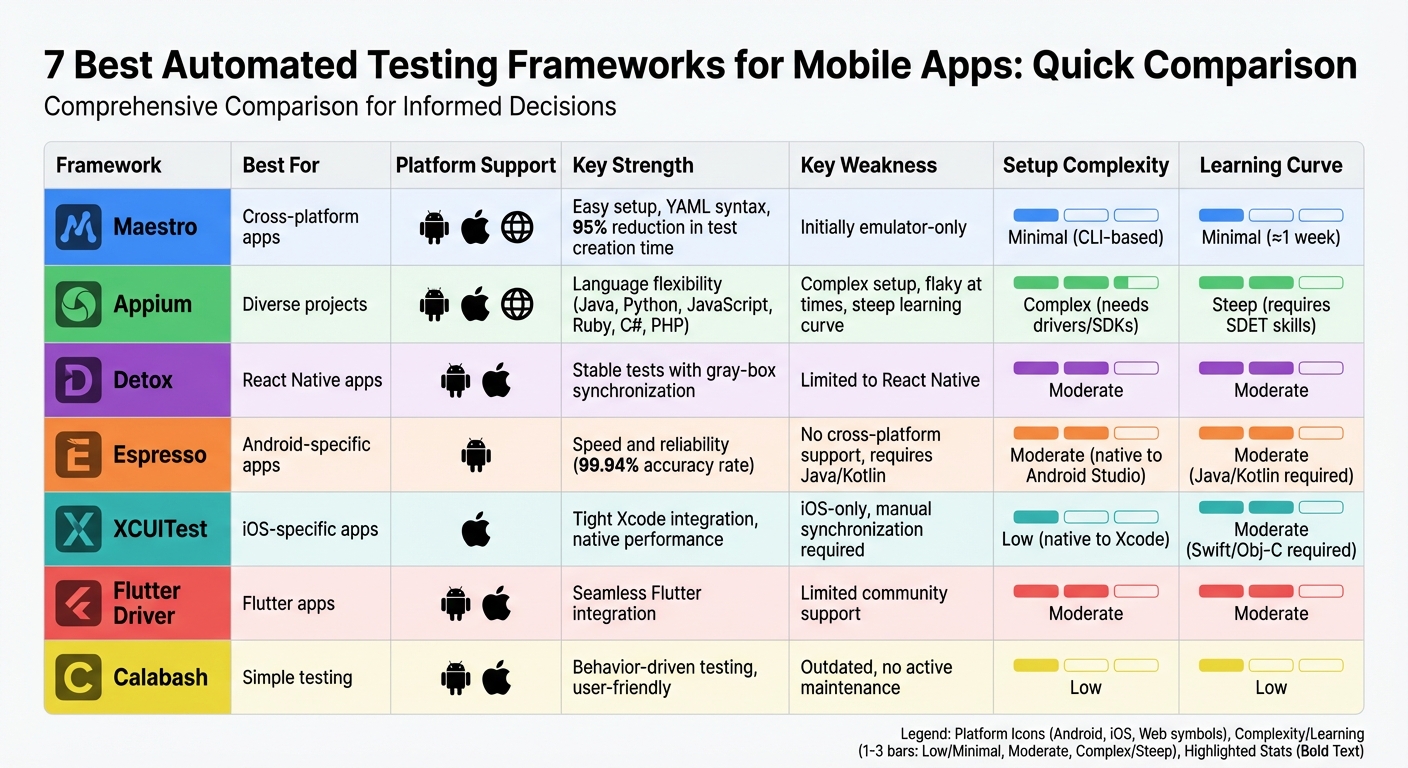
Mobile Testing Frameworks Comparison: Features, Strengths and Weaknesses
Mobile Test Automation Tools for 2024 and beyond
sbb-itb-e343f3a
1. Maestro
Maestro simplifies mobile testing, cutting through the usual setup hassles. It’s a single binary that doesn’t require drivers, SDKs, or complicated configurations. You can get your first test up and running in less than 5 minutes.
Testing Architecture
Maestro operates using an interpreted execution model and a straightforward declarative YAML syntax. With this setup, you define user journeys - called "Flows" - in YAML files, focusing on what needs to happen rather than how it’s done. Since there’s no compilation step, you can make changes and rerun tests instantly.
For those who prefer a visual approach, Maestro Studio offers a no-code interface. This free desktop app empowers developers, QA testers, and even product managers to build tests visually. It comes with a built-in element inspector and interactive command generator, which suggests test commands as you click on elements.
This efficient design works seamlessly across various platforms.
Platform Support
Maestro’s universal YAML syntax means you don’t need to juggle multiple codebases or learn platform-specific APIs. It supports a wide array of platforms, including:
| Platform / Framework | Supported |
|---|---|
| Android (Views & Jetpack Compose) | ✅ |
| iOS (UIKit & SwiftUI) | ✅ |
| React Native | ✅ |
| Flutter | ✅ |
| Web (Desktop & Mobile) | ✅ |
| .NET MAUI (iOS & Android) | ✅ |
| Capacitor / Cordova | ✅ |
Test Stability
Maestro doesn’t just make testing simpler - it makes it more reliable. It reduces flakiness by managing UI synchronization automatically, waiting for elements to load and settle without relying on manual sleep commands or timeouts. Instead of relying on fragile XPaths or element IDs, you interact with the app using text and visual cues, mimicking how a real user would.
"Maestro embraces the instability of mobile applications and devices and tries to counter it." – Maestro Documentation
This approach has led to impressive results. Case studies from companies like Wahed show test creation time reduced from 3-4 hours to 10-15 minutes (95% reduction), while Eneco cut regression testing from 16 hours to under an hour.
Scalability
Maestro’s simplicity and stability make it easy to scale, whether you’re working in a local environment or testing at an enterprise level. With Maestro Cloud, you can run tests in parallel with enterprise-grade execution and detailed reporting.
2. Appium
Appium is an open-source framework that uses the WebDriver protocol to automate mobile app testing. Acting as a server, it translates test commands into native actions on Android (via UIAutomator2) and iOS (via XCUITest), without needing any changes to the app's source code.
Testing Architecture
Appium's architecture is more complex, requiring management of drivers, SDKs, and language bindings. It supports multiple programming languages, including Java, JavaScript, Python, Ruby, C#, and PHP, allowing teams to stick with tools they already know. As a black-box testing tool, it simulates user interactions with the app, even handling system-level elements like permission dialogs and notifications. This makes it versatile, especially for teams working on diverse platforms.
Platform Support
Appium supports Android, iOS, Windows, and mobile web applications through a single API. For Android, it uses UIAutomator2 for API level 16 and above, while Selendroid is available for older versions. On iOS, real-device testing requires a $99/year Apple Developer Program membership.
"Appium remains the industry standard for cross-platform native and hybrid E2E testing." – QA Wolf
Its broad platform compatibility is a major advantage, but stability is another factor to consider.
Test Stability
One challenge with Appium is occasional flakiness due to its lack of built-in waits. Testers need to implement explicit waits and retry logic to improve reliability. Using strong locators, like Accessibility IDs, can also help minimize issues.
Performance
Appium's runtime is relatively heavy, leading to slower feedback loops compared to native tools like Espresso or XCUITest, which sync directly with the UI. However, its ability to work across platforms often outweighs this performance trade-off.
Scalability
Appium supports parallel testing on real devices, emulators, and simulators, and it integrates with cloud testing platforms. This makes it a good fit for large-scale CI/CD pipelines. That said, as test suites grow, teams may face increased maintenance due to manual synchronization requirements.
"If you expect to scale, integrate with custom systems, or support advanced test logic, Appium gives you more room to grow." – QA Wolf
Appium is free under the Apache 2.0 license, but scaling your test suite may involve costs like cloud device subscriptions, Apple Developer Program fees, and CI infrastructure expenses. Despite its performance and stability challenges, Appium's cross-platform capabilities make it a strong option for teams needing flexibility and broad device support.
3. Detox
Detox is an open-source framework built specifically for automating UI testing in React Native applications. It uses a "gray-box" testing method, which synchronizes with the app's internal state to reduce test flakiness - an issue that often plagues mobile testing.
Testing Architecture
Detox stands out from traditional black-box frameworks by running directly within the app's environment instead of interacting through an external server. This approach allows it to manage waits and synchronization automatically by tracking the app's internal activity. As a result, testers don’t need to add manual waits, making tests more efficient and reliable.
Platform Support
Detox works seamlessly on both iOS and Android platforms, making it an excellent choice for teams developing React Native apps. Its ability to execute tests across platforms ensures consistency and improves overall test stability.
Test Stability
Thanks to its architecture, Detox provides highly stable test executions. By monitoring elements like animations, network requests, and timers until they complete, it significantly reduces test flakiness. To further improve reliability, following best practices - like assigning unique identifiers or Accessibility IDs to UI elements - is recommended.
Detox showcases the advanced techniques available today for improving mobile UI testing efficiency and reliability.
4. Espresso
Espresso is Google's official UI testing framework for Android. It operates directly within the app's process, allowing it to access the app's memory and main UI thread. This setup ensures fast and dependable test execution.
Testing Architecture
Espresso's standout feature is its automatic synchronization with the app's UI thread. Before performing any test action, it waits for the UI thread to become idle. This is achieved through idling resources, which monitor background tasks, animations, and network requests. Thanks to this synchronization mechanism, Espresso boasts an impressive 99.94% accuracy rate.
The framework integrates seamlessly with Android Studio and supports both Java and Kotlin. Its Test Recorder tool allows testers to capture user interactions and automatically generate test code, making it easier to build comprehensive test suites. Since Espresso is part of the AndroidX library, it aligns with modern Android development standards and works smoothly with Gradle-based CI/CD pipelines. Its synchronization and tooling make it a top choice for Android-specific testing.
Platform Support
Espresso is designed exclusively for Android applications. Unlike some frameworks that support cross-platform testing, Espresso's deep integration with Android allows it to deliver exceptional performance for native apps. However, for cross-platform projects, teams need to complement Espresso with an iOS-specific framework like XCUITest, resulting in separate test suites for each platform.
Performance
By running directly within the app's process, Espresso eliminates the need for external communication, giving it a performance edge. This efficiency makes it perfect for rapid feedback during active development. Its quick execution times further enhance its reputation for reliability.
Test Stability
Espresso's built-in synchronization ensures stable and predictable test behavior, reducing the likelihood of flaky tests caused by timing issues. Its deterministic nature has earned it high ratings, including a 4.6/5 on G2 and a 4.8/5 on TestSprite, where reviewers frequently praise its reliability.
Scalability
| Aspect | Details |
|---|---|
| Advantages | Espresso's speed and low flakiness make it ideal for large-scale in-app testing during development cycles. |
| Limitations | It cannot interact with system-level elements like notifications or permission dialogs without additional tools like UIAutomator2. |
| Cross-Platform Testing | Teams working on multi-platform products must create and maintain separate test suites for iOS, increasing the overall testing workload. |
| Skill Requirements | Testers need proficiency in Java or Kotlin and access to the app's source code, which can limit participation from non-developer QA professionals. |
Espresso is a reliable and efficient framework for Android-specific testing, particularly for teams focused solely on Android development. Its performance, stability, and alignment with Android development practices make it a strong choice for core feature testing. That said, for organizations with cross-platform needs, the additional effort of maintaining separate test suites may require careful consideration.
5. XCUITest
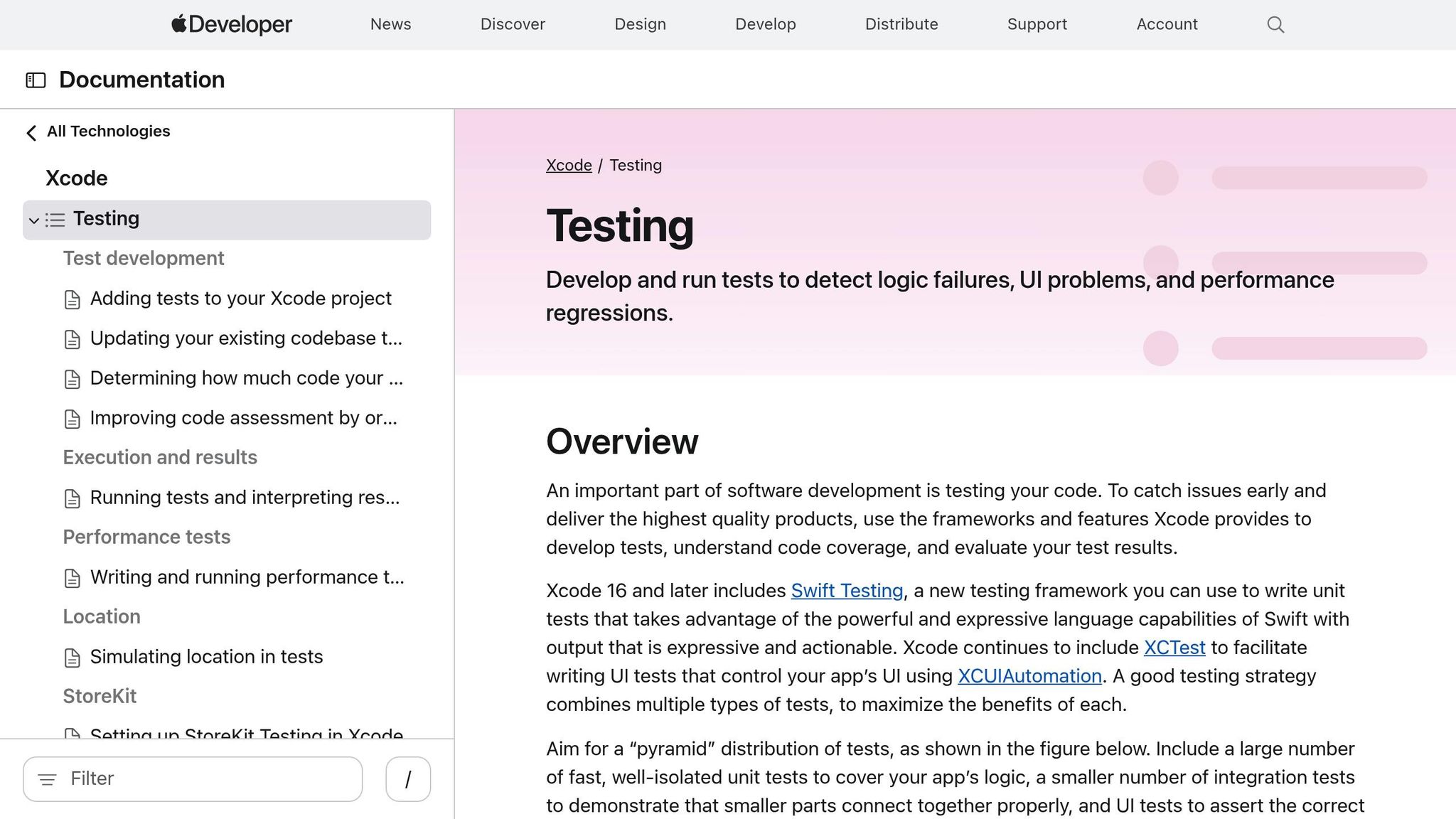
XCUITest is Apple's official testing framework for iOS apps, seamlessly integrated into the Xcode IDE. Designed as a gray-box framework, it allows testers to validate user-facing behavior while also accessing the app's internal state, making it a vital tool for iOS automation alongside other mobile testing solutions.
Testing Architecture
XCUITest tests are written in Swift or Objective-C, the same languages used for iOS development. This keeps the tests closely tied to the app's codebase. The framework supports both UIKit and SwiftUI, ensuring compatibility with Apple's UI libraries. However, unlike some frameworks that manage synchronization automatically, XCUITest relies on developers to handle UI transitions and asynchronous operations manually. This often involves setting explicit delays or creating custom wait conditions to deal with elements like network loading or animations. While this approach aligns well with Apple's platform-specific focus, it requires extra effort to ensure smooth test execution.
Platform Support
XCUITest is built exclusively for iOS, requiring macOS and Apple hardware for both development and test execution. This exclusivity means that teams working on cross-platform apps must maintain separate test suites for Android. Additionally, testing on real devices requires an Apple Developer Program membership, which costs $99 annually per tester.
Performance
Thanks to its native integration, XCUITest offers fast execution with minimal overhead. This makes it a great choice for teams focused entirely on Apple's ecosystem, as it delivers efficient and reliable results.
Test Stability
The tight integration with Xcode helps XCUITest synchronize well with an app’s internal state. However, the need for manual synchronization to manage asynchronous UI transitions can impact test stability. Developers must carefully handle these aspects to avoid flaky tests. While XCUITest is a cornerstone of iOS automation, its stability challenges have led to the emergence of newer frameworks aimed at addressing these limitations.
Scalability
| Aspect | Details |
|---|---|
| Infrastructure Costs | Scaling up requires significant investment in Apple hardware or access to cloud-based device farms like Sauce Labs, which offers over 9,000 real devices. |
| Parallelization | Teams can speed up feedback cycles by running tests in parallel using multiple CI runners or leveraging Xcode Server. |
| Scope Limitations | While excellent for in-app testing, XCUITest struggles with system-level interactions, such as managing notifications or permission dialogs. Supplementary tools may be needed for these scenarios. |
XCUITest is the go-to framework for iOS developers who prioritize speed and precision in UI validation within Apple’s ecosystem. Its native integration and efficient performance make it an excellent choice for iOS-exclusive teams. However, the need for manual synchronization and the hardware requirements can pose challenges, especially for organizations managing cross-platform projects. These scalability considerations highlight XCUITest's strengths and limitations in the broader context of mobile automation testing.
Strengths and Weaknesses
After reviewing the frameworks in detail, here's a concise breakdown of their key strengths and weaknesses for mobile test automation.
Each framework brings something different to the table. Maestro stands out for its minimal setup and built-in flakiness control, making it a great choice for projects spanning iOS, Android, and web apps. Its single test syntax simplifies cross-platform automation.
Appium is highly flexible, with support for multiple programming languages (like Java, Python, and JavaScript) and platforms. It also benefits from a mature community. However, its setup can be quite complex, requiring drivers and SDKs, which creates a steep learning curve. Additionally, Appium tests can be verbose, and dynamic UIs often lead to flakiness due to the need for explicit waits.
Espresso excels in Android testing, offering fast and reliable execution. Its synchronized approach automatically handles UI operations, reducing flakiness. However, it's limited to Android, so teams working on iOS need separate test suites. It also requires integration with the app's codebase and knowledge of Java or Kotlin, which can pose a challenge for non-developers.
XCUITest mirrors Espresso's benefits but for iOS. It delivers fast execution with tight integration into Xcode, making it ideal for iOS-focused teams. Like Espresso, it’s limited to a single platform. Manual synchronization for asynchronous UI transitions can affect test stability, and familiarity with Swift or Objective-C is essential.
Here’s a quick comparison to highlight the key points:
| Framework | Main Strength | Main Weakness | Setup Complexity | Learning Curve |
|---|---|---|---|---|
| Maestro | Fast test authoring; flakiness control | Limited to emulators/simulators initially | Minimal; CLI-based | Minimal (≈1 week) |
| Appium | Multi-language support; mature ecosystem | Complex setup; higher flakiness | Complex; needs drivers/SDKs | Steep; requires SDET skills |
| Espresso | Synchronized execution; fast on Android | Android-only; needs codebase integration | Moderate; native to Android Studio | Moderate; Java/Kotlin required |
| XCUITest | Native iOS performance; Xcode integration | iOS-only; manual synchronization required | Low; native to Xcode | Moderate; Swift/Obj-C required |
This comparison provides a clear snapshot to help you weigh the options and select the framework that best suits your needs.
Conclusion
If you're developing a native Android app with a team experienced in Kotlin or Java, Espresso is a solid choice. It provides swift, synchronized execution directly within Android Studio. On the other hand, for iOS-only projects where your team uses Xcode and Swift, XCUITest is the logical option.
For teams looking to work across both Android and iOS, Appium brings flexibility with its wide language support and established ecosystem. However, its steeper learning curve and the need for manual wait handling can make test creation more complex and prone to flakiness.
Maestro shines for teams aiming for speed and simplicity in automation. Its declarative YAML syntax allows even non-technical team members - like manual testers or product managers - to create and maintain tests in record time. Real-world examples back this up: Wahed reduced test creation time from hours to minutes, Eneco slashed regression testing from 16 hours to less than one, and Komoot built over 100 automated tests in just two weeks. These results highlight how Maestro can drastically improve test coverage efficiency.
When choosing a framework, consider your team’s technical skills, project requirements, and testing goals. Each tool has its strengths, whether platform-specific or cross-platform. For those new to mobile automation or needing to scale test coverage quickly, Maestro provides an accessible and reliable solution for production-grade testing.