YAML simplifies Flutter test automation by offering a clear, human-readable format for creating and managing test scenarios. It eliminates the need for complex coding, reduces test flakiness, and supports cross-platform testing. Tools like Maestro make YAML-based testing even easier by providing real-time test execution, dynamic waits, and debugging tools. Key practices include:
-
Organized File Structure: Name files based on user journeys (e.g.,
flow_login_android.yaml) and organize them into folders by app sections. - Proper Indentation: Use consistent spacing (2-4 spaces) to avoid errors.
- Comments for Clarity: Add meaningful notes to explain steps and configurations.
- Modular Test Flows: Break tests into smaller, reusable flows for easier updates and debugging.
-
Built-in Smart Waiting: Maestro automatically waits for UI elements without manual
sleep()calls or explicit wait commands.
Integrating YAML tests into CI/CD pipelines ensures efficient testing during development. Parallel execution and detailed test reports further streamline the process, making it easier to maintain and scale your test suite effectively.
How to Structure YAML Files for Flutter Test Automation
Organized YAML files are the backbone of effective test automation in Flutter. A clear structure not only makes your test suite easier to manage but also ensures it can grow with your application.
File Naming and Organization
When naming YAML files, it's best to align them with specific user journeys. Use a pattern like flow_[feature/module]_[platform].yaml. This approach makes it easy to identify both the functionality being tested and the platform it targets. For instance:
-
flow_contacts_android.yamlfor Android-specific contact management tests -
flow_contacts_ios.yamlfor the same feature on iOS
This modular naming system is incredibly helpful. If a test fails, you’ll know exactly which file to investigate. Similarly, when a user flow needs updates, having each journey isolated in its own YAML file simplifies the process.
For better organization, group files into folders based on app sections - like authentication, shopping, or profile_management. This folder structure not only keeps things tidy but also makes onboarding new team members much smoother. Plus, it provides a clear roadmap for navigating the test suite.
Indentation and Formatting Rules
YAML’s structure depends entirely on proper indentation. Unlike programming languages that use brackets or semicolons, YAML uses spaces to define relationships between elements. Even the smallest indentation error can break your test script, so consistency is key.
For example, Maestro's documentation offers a great guide for formatting mobile contact flows. At the top level, you'll often see the appId, followed by commands like launchApp, with subsequent steps - such as - tapOn: and - inputText: - indented to reflect their order of execution.
Here’s a quick example of how your YAML should look:
appId: com.example.app
---
- launchApp
- tapOn: "Settings"
- tapOn: "Account"
- inputText: "user@example.com"
- tapOn: "Save"
Stick to consistent indentation - 2 to 4 spaces is ideal. Tools like Maestro Studio Desktop can help by generating properly formatted YAML commands automatically. This minimizes human error and ensures uniformity, especially when multiple team members are contributing to the test suite.
Adding Comments for Clarity
Comments turn your YAML files into more than just test instructions - they become self-documenting resources. While steps might seem obvious when you write them, they may not be as clear to others (or even to you) months down the line.
Use the # symbol to add comments that explain complex actions, configurations, or the reasoning behind certain steps. For instance, you can start each file with a comment about its purpose:
# flow_contacts_android.yaml
# This file tests the contact management flow on Android
Go beyond basic notes. Instead of writing # Tap on login button for a tapOn: "Login" command, add context like # Using email login to validate form submission. This kind of detail is invaluable for troubleshooting and maintaining your tests over time.
Comments are also a great place to document known issues, temporary fixes, or platform-specific behaviors. Including this information directly in the test file ensures that anyone working on it later understands the reasoning behind your choices.
Creating and Managing Test Flows in YAML
Test flows are essential for automating Flutter tests, as they outline complete user journeys - from app launch to task completion.
Building Modular and Reusable Test Flows
Maestro simplifies test automation by breaking down complex user journeys into smaller, manageable flows. Instead of creating one massive test that covers everything from login to checkout, you can design individual flows for key interactions like Login, Add to Cart, Checkout, or Profile Management.
This modular approach makes it easier to update and debug tests when changes are made. If a test fails, you can quickly identify the specific flow causing the issue, saving time and effort. For instance, in an e-commerce app, you might have flow_login_android.yaml for user authentication and flow_product_search_ios.yaml for search functionality. When testing the entire purchase process, you can reuse these smaller flows instead of duplicating steps. By treating each flow as a realistic user journey, your tests become more intuitive, easier to write, and simpler to maintain.
This approach works seamlessly with Maestro's YAML syntax, which keeps things clear and concise.
Using Maestro's Simple YAML Syntax
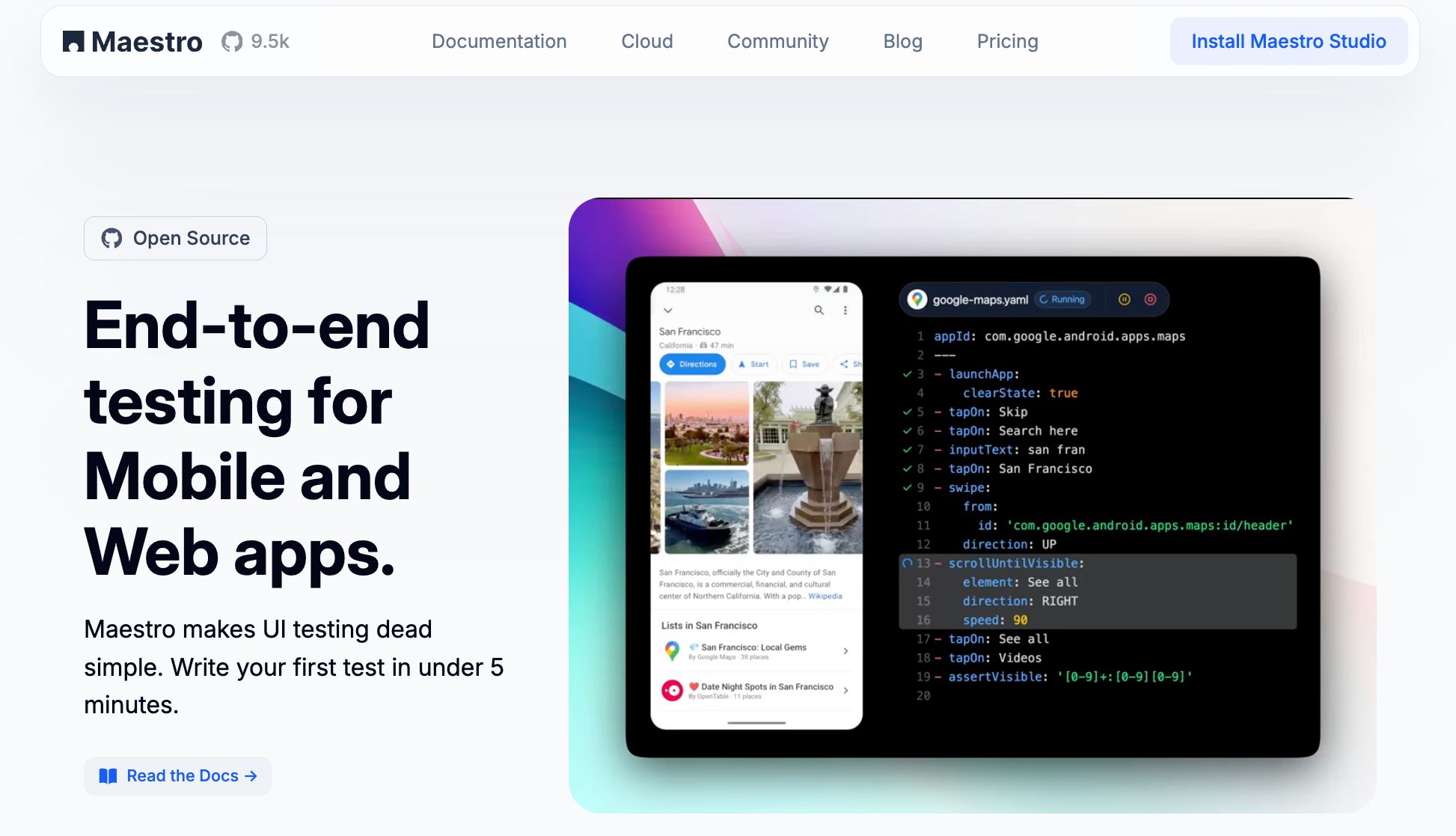
Maestro’s YAML syntax takes the complexity out of mobile test automation. Commands like launchApp, tapOn, inputText, and assertVisible are straightforward, reading almost like plain English. This makes tests easy to understand and quick to update.
One of Maestro's standout features is its ability to wait for elements to load automatically. This reduces the chances of flaky tests and makes writing reliable flows much simpler. Additionally, because YAML files are interpreted in real-time, any updates take effect immediately. Maestro continuously monitors your files and reruns tests as you make changes, speeding up your development process.
Another advantage of this readable syntax is its accessibility. Anyone on your team - whether they wrote the original test or not - can easily understand and modify flows. This flexibility is critical as your app grows and evolves, ensuring your testing efforts can keep up.
Common Test Scenario Examples
Here’s a basic example of creating a new contact in an Android app:
# flow_contacts_android.yaml
appId: com.android.contacts
---
- launchApp
- tapOn: "Create new contact"
- tapOn: "First Name"
- inputText: "John"
- tapOn: "Last Name"
- inputText: "Snow"
- tapOn: "Save"
This flow follows a simple structure: launch the app, navigate using tapOn commands, input data, and complete the task.
For a more advanced scenario, like following a user on a social media app, the same principles apply, with added assertions to verify outcomes:
appId: com.twitter.android
---
- launchApp
- tapOn: "Search and Explore"
- tapOn: "Search Twitter"
- inputText: "@mobile__dev"
- tapOn: "mobile.dev"
- tapOn: "Follow"
- assertVisible: "Following"
In this example, assertVisible ensures the follow action was successful by checking that the "Following" status appears.
When creating test scenarios, focus on critical user paths. Each scenario should have a clear starting point, logical steps, and a definitive way to verify success. As your app's interface evolves, Maestro's human-readable YAML makes it easy to identify and adjust steps, keeping your tests aligned with real-world user behavior.
These examples show how structured YAML flows can strengthen UI testing and help you tackle test flakiness with confidence.
Making Tests Reliable and Handling Flakiness
Continuing from the discussion on YAML structure and test flow design, let’s dive into how Maestro enhances test reliability and handles flakiness. Test flakiness - those random failures caused by timing issues, UI changes, or network delays - can be a major headache. It not only undermines the value of your tests but also slows down development. Maestro tackles these challenges head-on with built-in features that make YAML-based Flutter tests more stable and predictable. Here’s how Maestro simplifies your test flows while boosting reliability.
Using Maestro's Built-in Flakiness Protection
One of Maestro’s standout features is its ability to manage UI instability automatically, so you don’t have to write custom retry logic. This keeps your YAML flows clean and focused on test logic, while Maestro handles the messy details like missed taps or delayed element appearances.
For instance, Maestro addresses common issues such as UI elements not appearing where they should or screen taps failing to register. Instead of worrying about defensive programming, you can focus on what your test needs to achieve. This is especially helpful for Flutter apps, where UI behavior can vary across devices and screen sizes.
The best part? Maestro’s flakiness protection works seamlessly in the background. Your YAML scripts remain simple and readable, while the platform ensures your tests are robust enough to handle the unpredictable nature of mobile UI testing.
Dynamic Waits and Assertions
Fixed delays like sleep() often cause more problems than they solve, slowing down tests and still risking failures. Maestro eliminates this issue with dynamic waits that pause just long enough for elements to load - no more, no less.
The platform’s built-in tolerance for delays ensures that your tests adapt to varying load times without unnecessary slowdowns. For example, you can use an assertion like assertVisible: in your YAML flows, and Maestro will dynamically wait for the element to appear before verifying it. Here’s a quick example:
- tapOn: "Load More Content"
- assertVisible: "Further Reading"
In this case, Maestro will wait for "Further Reading" to become visible and then confirm it’s displayed. This dynamic waiting mechanism keeps your tests reliable, even when timing variations occur, all while maintaining clean and straightforward YAML syntax.
This intelligent waiting system applies across all Maestro commands, whether you’re tapping a button, entering text, or navigating screens. By waiting for elements to become interactive before proceeding, Maestro minimizes false failures and ensures trustworthy test results. And if timing issues persist, Maestro’s debugging tools are there to help you quickly identify and resolve the problem.
Debugging and Improving Test Flows
When tests fail, quick debugging is crucial. Maestro provides a suite of tools to help you pinpoint and resolve issues efficiently. Its interpreted test execution feature allows you to monitor your YAML files and rerun them as you make updates, enabling rapid iteration.
For even more support, Maestro integrates MaestroGPT, an AI assistant designed to help with troubleshooting and optimization. You can ask it questions about command generation or specific problems in your test flow. This AI-powered guidance not only speeds up problem-solving but also helps you learn how to create more reliable test scripts.
With fast iterations, visual debugging, and AI assistance, Maestro ensures you can resolve issues quickly and maintain reliable test suites as your Flutter app evolves. This rapid feedback loop is essential for keeping your tests effective, even as your app grows in complexity.
sbb-itb-e343f3a
Adding YAML Test Automation to CI/CD Pipelines
After creating reliable YAML test flows with Maestro - designed to handle flakiness and delays - you can take the next step by integrating these flows into your CI/CD pipeline. This setup helps catch issues automatically before they reach production. With Maestro's YAML-based flows, you ensure consistency from local development to automated CI/CD processes. Let’s dive into how to configure Maestro for seamless CI/CD integration.
Setting Up Maestro in CI/CD Workflows
Maestro’s single binary architecture makes it easy to set up, whether locally or in containers. For CI/CD integration, Maestro’s cloud infrastructure supports testing at three critical stages: Pull Requests, Pre-Release, and Nightly Builds. Start by following Maestro’s Quickstart Guide, which walks you through connecting your YAML test flows to the cloud infrastructure. Once set up, your CI/CD pipeline can automatically trigger Maestro tests whenever code changes are pushed or pull requests are opened. This ensures Flutter-specific issues are caught early, when they’re simpler to address.
After the initial setup, you can further enhance efficiency by enabling parallel test execution.
Running Tests in Parallel for Speed
Speed is a priority in CI/CD environments where developers rely on quick feedback. Maestro allows you to run YAML test flows in parallel across Android and iOS devices, drastically reducing execution times. For instance, a test suite that might take 30 minutes to run sequentially can be completed in just 5 minutes with parallel execution.
In February 2025, Maestro showcased this capability when its CI/CD pipeline successfully completed "Maestro smoke tests (29/29)" in only 5 minutes.
The Cloud Plan unlocks this parallel execution feature, keeping your CI/CD pipeline efficient while maintaining comprehensive test coverage.
Test Reports and Metrics
Detailed test reports offer valuable insights, including metrics like flow run counts, failure rates, and average run times. These reports help teams monitor trends and address issues proactively.
Test reports provide metrics like flow run counts, failure rates, average run times, and passing percentages to help teams monitor trends and address issues proactively. Examples such as the "Nightly Test Results" (78 tests passed, 3 failed) and the "RC-3.4.0 Test Results" (237/237 tests passed) provide detailed feedback that helps teams quickly identify and resolve issues.
Key Points and Takeaways
When it comes to YAML practices for Flutter test automation, success lies in keeping things simple, organized, and leveraging the right tools. Teams that excel in this area often create modular test flows that align with specific user journeys. For clarity and efficiency, they use descriptive file names like flow_contacts_android.yaml and flow_contacts_ios.yaml to indicate both the purpose of the test and the platform it targets.
A few important principles stand out here. First, using declarative syntax ensures that tests are easy to maintain. Tools like Maestro, with its straightforward commands such as launchApp and tapOn, make test scripts readable and accessible to everyone on the team. This is essential for scaling and maintaining the test suite over time.
Flutter test automation works best when it embraces the stability features built into the framework rather than trying to counteract app instability. For example, dynamic waits are a game-changer, removing the need for manual delays or complicated retry mechanisms.
"Built-in tolerance to delays. No need to pepper your tests with
sleep()calls. Maestro knows that it might take time to load the content (i.e. over the network) and automatically waits for it (but no longer than required)." (Maestro Documentation)
Visual tools and AI assistance also play a crucial role in speeding up test creation and maintenance. Maestro Studio, for instance, lets teams record user actions and automatically convert them into YAML commands. Meanwhile, AI assistants can generate commands and provide guidance during development. This combination has enabled teams to write their first test in just a few minutes without compromising reliability.
Adopting consistent YAML structures, as outlined earlier, boosts maintainability while improving efficiency across platforms like iOS, Android, and web. This unified approach simplifies test development and integrates seamlessly into CI/CD pipelines. Speaking of CI/CD, incorporating YAML test automation into your deployment pipeline transforms it from a basic development tool into a continuous quality assurance system. By catching issues early - when they're easier and cheaper to fix - you ensure your Flutter applications remain reliable and high-performing throughout their lifecycle.