
React Native apps need solid testing to ensure they work smoothly on both iOS and Android. This article highlights three top testing frameworks for React Native:
- Maestro: Simplifies end-to-end (E2E) testing with YAML-based scripts. It requires minimal setup and works seamlessly across platforms. Great for teams wanting fast, reliable tests without modifying native code.
- Detox: A powerful E2E testing tool that synchronizes with app activity for stable and fast tests. It requires more setup, but it's ideal for performance-focused workflows.
- Jest: Perfect for unit and component testing. It's lightweight, runs in a Node.js environment, and is pre-configured for React Native projects.
Quick Comparison:
| Feature | Maestro | Detox | Jest |
|---|---|---|---|
| Test Type | E2E (Black-box) | E2E (Gray-box) | Unit, Component |
| Setup Complexity | Low | High | Moderate |
| Execution Speed | 12–18 sec per flow | 8–12 sec per flow | Milliseconds |
| Platform Support | iOS, Android, Web | iOS, Android | Node.js (Simulated) |
| Flakiness Rate | <1% | <2% | Extremely Low |
| CI/CD Integration | Simple | Moderate | Excellent |
Each framework serves different needs. Use Jest for unit tests, Maestro for simple E2E testing, and Detox for advanced E2E workflows. A balanced strategy combining these tools ensures reliable, high-quality apps.
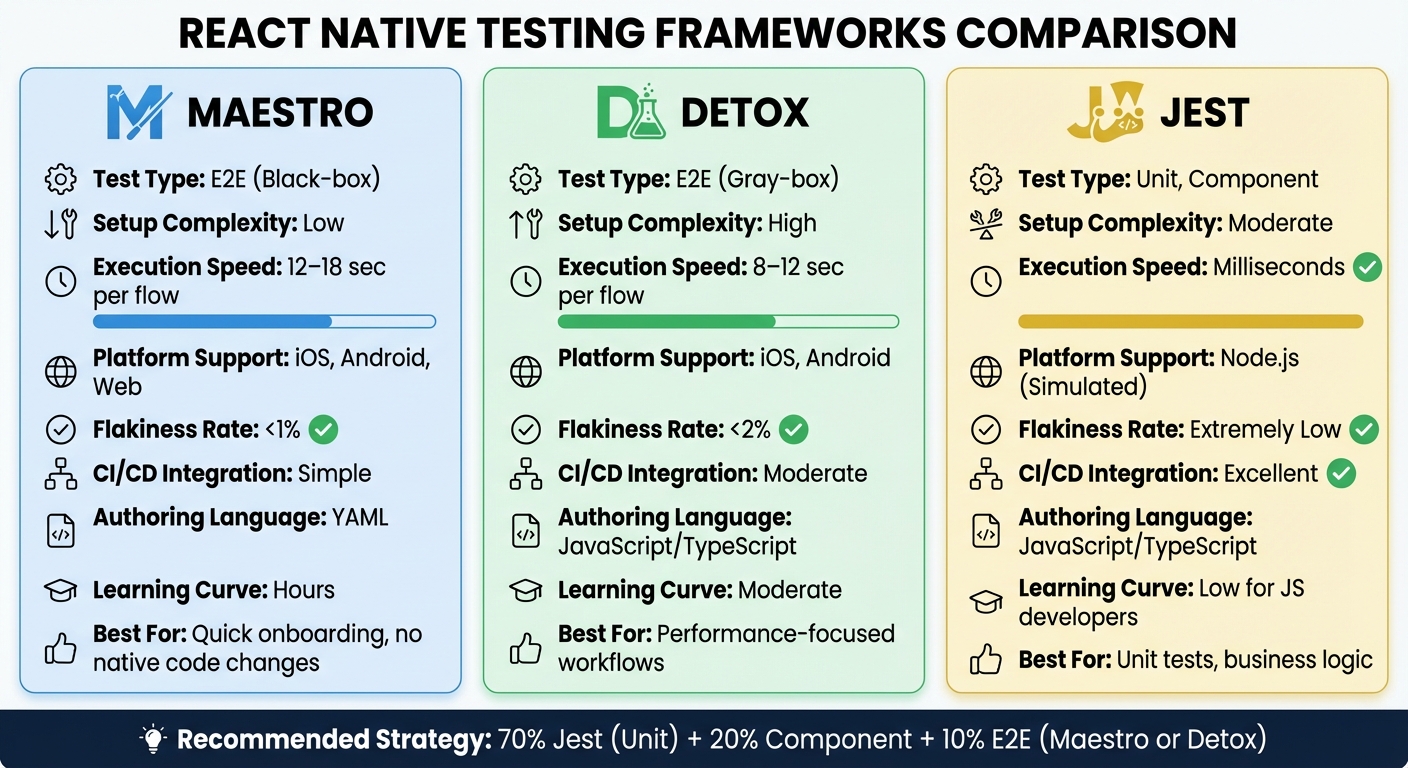
React Native Testing Frameworks Comparison: Maestro vs Detox vs Jest
Henry Moulton – React Native end-to-end testing with Maestro | App.js Conf 2023
sbb-itb-e343f3a
1. Maestro
Maestro is a testing framework designed specifically for mobile apps, including React Native. It works as a black-box testing tool, interacting with the app's final bundled version just like a real user. The best part? It doesn’t require any changes to your JavaScript or native code. This keeps your test setup simple and your codebase untouched.
Test Type (E2E/Unit)
Maestro focuses exclusively on end-to-end (E2E) testing, ensuring that complete user journeys - like signing up, making purchases, or navigating between screens - work as they should. It uses a declarative YAML-based syntax to define app behaviors. For instance, a login flow test might include steps like tapping a button, entering login details, and verifying the home screen appears. All of this is written in clear, easy-to-read YAML, making it ideal for testing React Native’s cross-platform user flows.
Platform Support (iOS/Android)
One of Maestro’s standout features is its full cross-platform support. You can write a single YAML test suite that works seamlessly on both iOS and Android, without needing platform-specific tweaks. It achieves this by leveraging accessibility features to ensure consistent behavior across both operating systems. This is a huge advantage for React Native developers aiming to deliver a uniform experience across platforms.
Flakiness Tolerance
Maestro’s synchronization engine ensures smooth test execution by waiting for UI elements, animations, and network responses to load before proceeding. It also includes retry logic and flexible element matching, which helps it adapt to minor UI changes without breaking. With flakiness rates often reported below 1%, Maestro is known for its reliability. Plus, it’s fast - executing black-box tests in about 12–18 seconds.
"Maestro was a breath of fresh air. No native dependencies, no build configuration changes, no excess configuration. Install the CLI, point it at your running app, and you're writing tests." - Daniel Taylor, Software Engineer, Add Jam
Setup Complexity
Maestro’s setup is refreshingly simple. It requires no instrumentation - no npm packages, no changes to native build files, no driver configurations. All you need is a single command to install the CLI (curl -fsSL "https://get.maestro.mobile.dev" | bash), and you’re ready to start testing. For teams with non-technical members, Maestro Studio offers a visual interface with AI assistance, making it possible to create and run tests without writing any code. This simplicity makes Maestro an excellent fit for React Native teams looking for hassle-free tools.
CI/CD Integration
Maestro integrates effortlessly with popular CI/CD tools like GitHub Actions, GitLab CI, and CircleCI. For teams looking to scale testing, Maestro Cloud offers parallel test execution on real devices. Pricing starts at $250 per device per month for iOS and Android, or $125 per browser per month for web testing. The cloud service includes unlimited hosted test runs, detailed reporting, and integration with pull or merge requests, making it a robust option for continuous testing workflows.
2. Detox
Detox is an open-source framework designed by Wix for end-to-end (E2E) testing in React Native apps. What sets Detox apart is its gray-box testing approach, which tracks network requests, animations, timers, and the React Native bridge. This ensures the app is fully idle before executing the next test step, eliminating the unreliable use of manual sleep() or waitFor() commands that can lead to flaky tests.
Test Type (E2E/Unit)
Detox is purpose-built for end-to-end testing. It simulates real-world user interactions to validate complete workflows in mobile apps. While it integrates seamlessly with Jest, you can also use other test runners like Mocha or Cucumber. By keeping tabs on the JavaScript thread, native UI queues, and in-app network activity, Detox ensures consistent and reliable test execution.
Platform Support (iOS/Android)
Detox supports both iOS and Android platforms, though the implementation varies slightly. For iOS, it uses the EarlGrey framework on simulators, while Android relies on Espresso for both emulators and physical devices. Currently, real device testing is available only for Android. Companies like Shopify and Wix rely on Detox to test their React Native apps.
Flakiness Tolerance
Thanks to its automatic synchronization engine, Detox achieves less than 2% test flakiness, even in complex test suites. It synchronizes with the native main thread, layout operations (like the React Native Shadow Queue), and asynchronous tasks via the React Native bridge. This synchronization means Detox can run tests much faster than traditional black-box frameworks - login flow tests, for example, typically complete in just 8–12 seconds.
"Detox eliminates the need for that malpractice [adding sleep/waitFor], and so introduces stability into the otherwise inherently-flaky test world." - Wix
Setup Complexity
Setting up Detox requires a fair amount of configuration, particularly at the native level. For Android, you’ll need to update build files, add test-related code, and adjust network security settings. On iOS, you’ll need to install tools like applesimutils and configure the .app path. Additionally, you must define build commands and binary paths for each app flavor (debug/release) in a configuration file, such as .detoxrc.js or package.json. If you’re using Expo, running expo prebuild is necessary to generate the required native directories. To ensure accurate element matching, make sure to mark UI components with the testID prop in your React Native code.
CI/CD Integration
Detox integrates smoothly with CI/CD tools like Travis CI, CircleCI, and Jenkins. It supports parallel test execution with Jest, and you can use the detox build command to trigger builds defined in your configuration. Adding device.reloadReactNative() in a beforeEach() block ensures every test starts with a clean app state. As an open-source framework, Detox is completely free to use.
3. Jest
Jest plays a critical role in testing by focusing on unit, integration, and component tests - key elements of a solid testing strategy. As the default testing framework for React Native, Jest has been automatically included in projects since version 0.38. Operating in a Node.js environment, it excels at testing individual functions, hooks, utility modules, and verifying how multiple modules interact. Trusted by over 500 companies, including Facebook, Airbnb, and Instagram, Jest has proven its reliability.
Test Type (E2E/Unit)
Jest is designed for unit, integration, and component testing, focusing on tests that don't depend on a mobile OS. Instead, it runs in a Node.js environment. Using the "React Test Renderer", Jest simulates the React Native environment without executing native code written in languages like Java, Kotlin, Swift, or Objective-C. With the release of Jest 30 in mid-2025, native TypeScript support was introduced, along with a 30% improvement in test execution speed.
"Component tests are only JavaScript tests running in Node.js environment. They do not take into account any iOS, Android, or other platform code which is backing the React Native components." - React Native Official Documentation
Platform Support (iOS/Android)
Although Jest runs in Node.js, it can simulate platform-specific behaviors using presets like jest-expo/ios and jest-expo/android. Since it doesn't execute native code, developers must mock native modules, such as AsyncStorage, NetInfo, or custom native modules, using jest.mock(). This flexibility makes Jest a valuable addition to end-to-end testing workflows.
Flakiness Tolerance
Jest tests are highly stable because they run in an isolated Node.js environment, avoiding issues like network dependencies, timing conflicts, or animation synchronization that often occur with device-based tests. Tests execute in milliseconds, providing quick feedback for every pull request. However, snapshot tests - used to capture the rendered component tree - can occasionally lead to false positives if they become too large, making them harder to review.
Setup Complexity
For React Native or Expo projects, Jest requires very little setup since it comes pre-configured. The release of Jest 30 further streamlined the process by allowing native TypeScript configuration files (jest.config.ts) without needing additional tools.
CI/CD Integration
Jest integrates smoothly into modern CI/CD workflows, working well with platforms like GitHub Actions, CircleCI, and Jenkins. By using the --ci flag, Jest ensures non-interactive execution and proper error handling. Since it doesn't rely on a mobile OS, Jest tests run faster and at a lower cost compared to end-to-end tests, making them ideal for frequent testing during pull requests. To optimize execution times, configure --maxWorkers for parallel processing and enforce coverageThresholds (e.g., 80% for branches and functions) to maintain code quality.
Framework Comparison
Here’s a side-by-side look at three popular testing frameworks, highlighting their strengths and differences. Use this comparison to decide which framework aligns best with your testing needs and the level of effort you're ready to invest in setup and development. The table below simplifies their key distinctions:
| Criteria | Maestro | Detox | Jest |
|---|---|---|---|
| Test Type | End-to-End (Black-box) | End-to-End (Gray-box) | Unit & Component |
| Platform Support | iOS, Android, Web | iOS, Android | Node.js (Simulated) |
| Flakiness Rate | <1% | <2% | Extremely Low |
| Setup Complexity | Low (Single CLI) | High (Native modifications) | Moderate (Standard npm) |
| Execution Speed | 12–18 seconds per flow | 8–12 seconds per flow | Milliseconds |
| Authoring Language | YAML | JavaScript/TypeScript | JavaScript/TypeScript |
| CI/CD Integration | Simple (Lightweight CLI) | Moderate (Requires native builds) | Excellent (Standard Node.js) |
| Learning Curve | Hours | Moderate | Low for JS developers |
Maestro shines for teams looking to onboard manual QA staff quickly or avoid making changes to native code. With its straightforward setup and YAML-based syntax, even non-developers can write tests in no time. While Detox offers faster execution for individual React Native test flows (8-12 seconds vs Maestro's 12-18 seconds per flow), Maestro's simplicity and zero-configuration approach often result in faster overall team productivity. Detox demands substantial effort in configuring native builds. Jest is unbeatable in speed, running tests in milliseconds, making it perfect for unit and component testing, which typically dominate the testing pyramid.
Real-world examples underline these differences. In September 2025, Jupiter, a fintech company, tested Maestro and Detox for their money management app. Detox struggled with frequent launch failures (succeeding only 2 out of 10 times on physical devices) and issues with animation synchronization. In contrast, Maestro’s simplicity, stability, and ease of use won them over. They even optimized their PIN entry process from 18 seconds to less than 1 second using Maestro’s JavaScript capabilities command.
"Maestro's overall simplicity, cross-platform support, and CI friendliness tipped the balance in its favour." - Joe McGuinness, Mobile UI Testing Expert
Conclusion
Choose a testing framework that aligns with your project's specific needs. Jest excels at unit testing and handling business logic in Node.js, making it a go-to option for testing functions, hooks, and state transitions. Maestro simplifies cross-platform end-to-end (E2E) testing with its YAML-based setup, while Detox offers fast E2E testing through gray-box synchronization, ideal for performance-driven applications.
A well-rounded testing strategy is crucial for maintaining app quality. A recommended approach is the testing pyramid: allocate 70% of your efforts to unit tests with Jest, 20% to component tests, and 10% to E2E tests. This structure ensures quick feedback during development while safeguarding critical user workflows.
For startups or teams working on tight timelines, Maestro's straightforward setup can be a great fit. On the other hand, teams with advanced JavaScript expertise might benefit from Detox's robust features and integrations. Regardless of your choice, Jest remains a strong foundation for unit and component testing.
"The more your tests resemble the way your software is used, the more confidence they can give you." - Yuri Kan, Senior QA Lead
Ultimately, successful teams combine the strengths of Jest for unit testing with Maestro for E2E coverage. Begin with Jest to establish a solid testing base, then add Maestro for straightforward, reliable end-to-end testing that works across platforms without complex setup. For teams requiring deep React Native integration and willing to invest in setup complexity, Detox remains an alternative option. By integrating these tools into a layered strategy, you can tackle React Native's challenges effectively and deliver a reliable, high-quality app.