Flaky tests are a common challenge in React Native development, causing unpredictable failures and delaying deployments. Two tools, Detox and Maestro, address this issue with different approaches:
- Detox uses a gray-box method, integrating directly with your app to monitor internal states like JavaScript threads, network activity, and animations. It ensures tests only run when the app is completely idle, reducing false positives and achieving flakiness rates below 2%.
- Maestro employs a black-box method, interacting with the app externally via the device’s accessibility layer. With features like automatic retries and smart wait times, it achieves flakiness rates below 1%, making it simpler to set up and use.
Quick Comparison
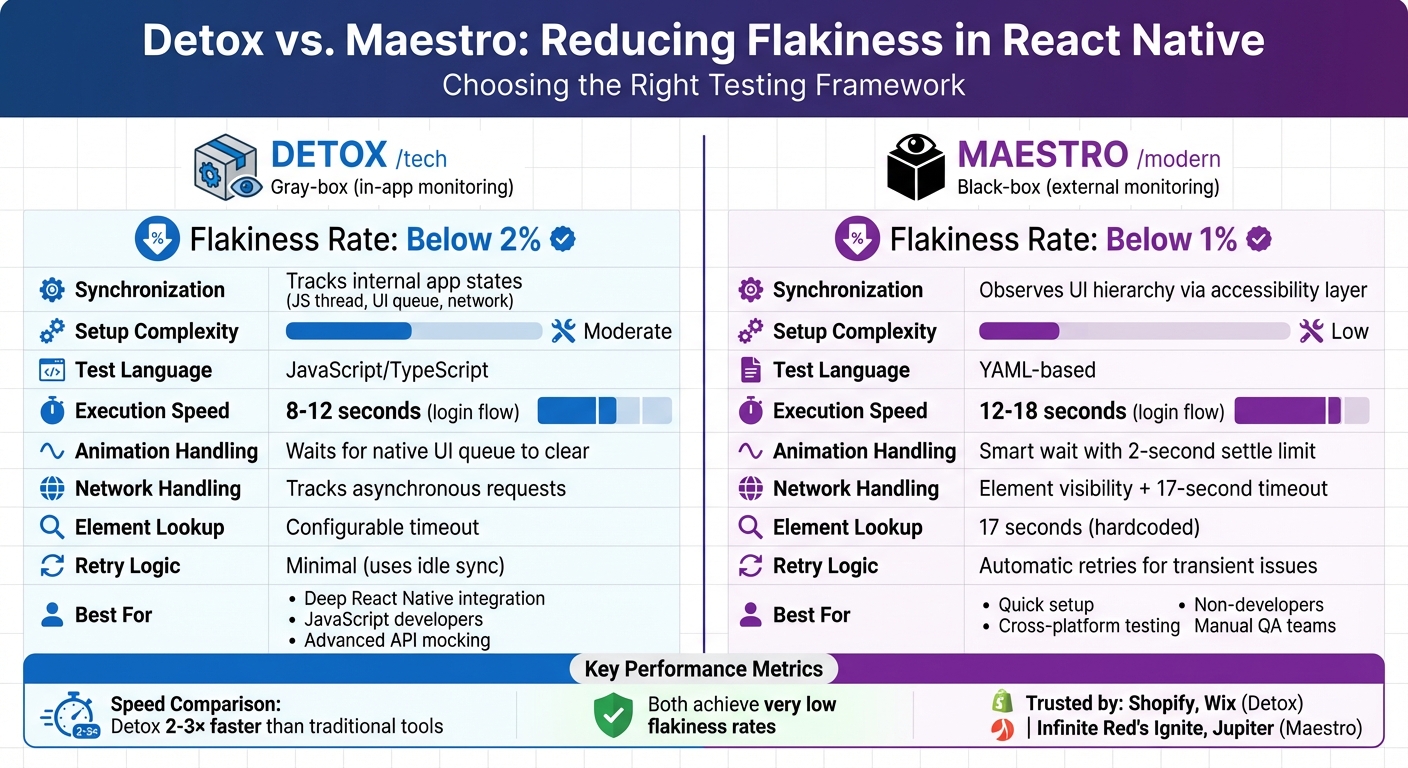
| Feature | Detox | Maestro |
|---|---|---|
| Testing Approach | Gray-box (in-app monitoring) | Black-box (external monitoring) |
| Flakiness Rate | Below 2% | Below 1% |
| Synchronization | Tracks internal app states | Observes UI hierarchy |
| Setup Complexity | Moderate | Low |
| Test Authoring | JavaScript/TypeScript | YAML-based |
| Execution Speed | 8–12 seconds (login flow) | 12–18 seconds (login flow) |
Choosing the right tool depends on your team’s needs: Detox is ideal for deep React Native integration, while Maestro offers simplicity and ease of use for non-developers. Both tools are reliable, but their methods suit different workflows and expertise levels.
Detox vs Maestro: React Native Testing Framework Comparison
How Detox Reduces Test Flakiness
Synchronization Engine and Event Handling
Detox operates directly within your app's process, giving it unparalleled access to native platform layers. This setup lets it monitor key elements like UI operations, asynchronous tasks, and animations, ensuring tight control over app lifecycle events and internal states.
Central to Detox's ability to reduce flakiness is its synchronization monitor. This native component keeps tabs on the React Native JavaScript thread, the native UI queue, and network activity. Tests only proceed when the app is completely idle - meaning all animations, network requests, and timers have finished. This eliminates the need for unreliable manual commands like sleep() or wait(), which can often lead to flaky tests.
"The synchronization engine distinguishes Detox from traditional tools. Traditional QA frameworks guess readiness through timeouts. Detox observes actual application state, reducing false positives dramatically." - Meghna Sen, Panto AI
Before executing each command, Detox's JS test runner queries the synchronization monitor to confirm that the app is idle. This seamless coordination is crucial for reducing false positives and ensuring consistent test reliability. By observing the app's actual state instead of relying on arbitrary timeouts, Detox maintains both accuracy and efficiency.
Performance Data and Stability Metrics
Production teams frequently report flakiness rates of less than 2%, even for complex test scenarios. Independent benchmarks show that Detox executes React Native test suites 2–3× faster than traditional debugging tools. For example, a typical login flow test takes roughly 8–12 seconds to complete.
Major companies like Shopify and Wix trust Detox to maintain test stability. Its deep integration with the app's internal state and in-process communication model reduces latency between test commands and execution. This streamlined approach plays a key role in keeping flakiness rates consistently low, even in diverse and demanding testing environments.
sbb-itb-e343f3a
How Maestro Reduces Test Flakiness

Maestro tackles test instability in React Native apps with a unique approach. Instead of requiring deep integration with your app's internal workings, it operates through the device's accessibility layer. This black-box testing method avoids dependencies tied to specific frameworks, which are often a source of test flakiness. By focusing on synchronization challenges, Maestro directly addresses one of the primary reasons for test failures in React Native environments.
Built-in Tolerance for Instability and Delays
Maestro's Zero-Wait Intelligence is designed to handle the unpredictable behavior of mobile apps. The framework keeps an eye on the UI state, view hierarchy, and main thread activity to determine when the app is idle and ready for the next step. This eliminates the need for inserting sleep() or pause() commands into your tests.
The synchronization engine ensures UI stability by checking for settling every 200 milliseconds, with animations allowed up to 2 seconds to complete. For element lookups, Maestro uses a default timeout of 17 seconds, while optional elements in conditional flows have a 7-second timeout. These features help manage network delays and dynamic content loading, reducing timing-related test failures.
Users have reported flakiness rates of less than 1%, and a typical login flow test takes just 12–18 seconds to complete.
These features make test creation smoother, which is further simplified by Maestro's YAML-based syntax.
YAML-Based Syntax and Test Maintenance
Maestro's declarative YAML format simplifies test creation and reduces errors. Instead of writing complex code with async/await patterns or manual synchronization, you simply define what needs to happen, and Maestro handles the how.
Here’s an example of a React Native login flow written in Maestro:
appId: com.yourapp.mobile
---
- launchApp
- tapOn: "Email"
- inputText: "user@example.com"
- tapOn: "Password"
- inputText: "SecurePass123"
- tapOn: "Sign In"
- assertVisible: "Welcome"
This simple, human-readable syntax allows team members like QA analysts, developers, and even product managers to write and maintain tests without needing advanced programming skills. If the UI changes, updating a test usually requires just a one-line change in the YAML file.
"Anyone who can read YAML can write tests. QA engineers without programming backgrounds can contribute immediately." - Nawaz Dhandala, Jupiter OneUptime
In May 2023, the React Native boilerplate Ignite (v8.7.0) by Infinite Red switched to Maestro as its default testing tool, offering a smoother end-to-end testing experience.
Fast Iteration and Automatic Retries
Maestro's efficiency goes beyond its error tolerance. Its tests run without requiring a compilation step, meaning you can edit YAML files and rerun flows instantly after saving. This saves significant time during debugging - changes can be tested in seconds rather than waiting for a full build cycle.
The framework also includes built-in retry mechanisms. If an assertion fails or an element doesn’t appear right away, Maestro retries the operation instead of failing the test outright. This is particularly beneficial in React Native apps, where delays in rendering or asynchronous updates can otherwise result in false negatives.
Maestro Studio, a desktop tool, enhances test creation by allowing you to inspect the element hierarchy and test commands in real time. You can click on UI elements to automatically generate YAML commands, ensuring selectors are stable before adding them to a flow. This interactive method helps catch potential flakiness issues early, rather than during continuous integration testing.
For teams looking to scale their testing efforts, Maestro Cloud enables parallel execution across real devices with varying OS versions and hardware configurations. It helps identify platform-specific issues while providing video recordings and detailed logs for debugging.
Detox vs. Maestro: Flakiness Reduction Methods
Differences in Synchronization and Stability
Detox and Maestro take very different paths when it comes to deciding whether a React Native app is ready for the next test step. Detox uses what’s called a gray-box approach. It injects monitoring libraries directly into the app’s native process. This allows it to track things like the React Native JavaScript thread, native UI queues, and network activity in real time. The result? It only moves forward when the app is completely idle, effectively avoiding race conditions.
Maestro, on the other hand, works as a black-box tool. It monitors the app externally by observing the UI hierarchy and animation states through the device’s accessibility layer. It uses preset intervals, with a fixed 2-second wait, to determine when the UI is stable. While this works well for standard animations, continuous visual changes - like shimmer effects or video backgrounds - can trick Maestro into thinking the UI hasn’t stabilized. This also impacts how each tool handles network delays and retry logic.
"Traditional QA frameworks guess readiness through timeouts. Detox observes actual application state, reducing false positives dramatically." - Meghna Sen, Author, Panto AI
When it comes to network delays, Detox waits for all network activity to finish before proceeding. Maestro, meanwhile, relies on element visibility and a default lookup timeout of 17 seconds.
Retry logic is another area where they differ. Maestro automatically retries failed interactions, giving transient issues a chance to resolve themselves. Detox, however, depends entirely on its synchronization engine, leaving retries to be handled externally. These approaches shape how each tool minimizes flakiness during testing.
Feature Comparison Table
| Feature | Detox | Maestro |
|---|---|---|
| Testing Approach | Gray-box (in-app instrumentation) | Black-box (external monitoring) |
| Synchronization | Tracks JS thread, UI queue, and network | Observes UI hierarchy and animation settling |
| Flakiness Rate | Very low (below 2%) | Very low (below 1%) |
| Retry Logic | Minimal (uses idle sync) | Automatic retries for transient issues |
| Animation Handling | Waits for native UI queue to clear | Smart wait with a 2-second settle limit |
| Network Handling | Tracks asynchronous requests | Relies on element visibility and timeouts |
| Element Lookup Timeout | Configurable | 17 seconds (hardcoded) |
| Setup Complexity | Moderate (requires native build changes) | Low (single binary, no app changes) |
| Execution Speed (Login) | 8–12 seconds | 12–18 seconds |
| Test Authoring | JavaScript/TypeScript | Declarative YAML |
Both tools deliver impressively low flakiness rates - Detox below 2% and Maestro below 1%. Their unique synchronization and retry mechanisms make them well-suited for different testing scenarios, depending on your priorities and requirements.
Choosing the Right Tool for Your React Native Tests
The right testing framework for your React Native project depends on your team's skills and the level of integration you need. Maestro shines when onboarding manual QA teams or avoiding native build configurations, while Detox is better suited for JavaScript developers who need programmatic test creation or advanced API mocking.
Take Jupiter's QA team, for example. In September 2025, they chose Maestro because it required no changes to their codebase and allowed their manual testers to get started quickly using YAML. By leveraging Maestro's runScript command, they slashed MPIN entry time from 18 seconds to under 1 second - achieving speeds within 10% of Detox.
"Since a large manual QA team needed to be onboarded to contribute to automation with minimal learning curve, Maestro's YAML-based declarative syntax was far more approachable compared to Detox's JavaScript/TypeScript tests." - Adarsh Nanwani, Jupiter
This example highlights how your team's structure and project needs can determine the best tool for the job.
If your project combines React Native with other platforms, Maestro's cross-platform capabilities offer extra flexibility. However, if you're sticking to React Native and need top-speed execution, Detox is optimized for that environment. For instance, a typical login flow runs in 8–12 seconds on Detox compared to 12–18 seconds with Maestro.
Teams dealing with CI stability issues on slower runners might appreciate Maestro's extendedWaitUntil, which lets you tweak the default 17-second timeout. Both frameworks are highly reliable, so your choice will likely come down to factors like setup complexity, team expertise, and long-term maintenance rather than stability metrics.