Test automation without version control is a recipe for chaos. It makes teamwork difficult, leads to outdated tests, and slows down scaling efforts. Version control solves these issues by organizing your test scripts, ensuring they stay in sync with your application, and streamlining collaboration.
Key Takeaways:
- Unified Source of Truth: Keeps tests aligned with the correct version of your application.
- Monorepo Advantage: Store application code and test scripts in one repository for seamless updates and CI/CD integration.
- Change Tracking: Logs every modification to help roll back problematic updates.
- Parallel Testing: Enables faster execution by dividing workflows.
-
Quality Gates: Use tags like
smokeorflakyto control test execution during builds.
Practical Tips:
- Organize repositories by user journeys or features.
-
Centralize configurations in a
config.yamlfile for consistency. -
Use
.gitignoreto exclude unnecessary files like logs and temporary outputs. - Adopt branching strategies (feature, trunk-based, or release) to keep tests and code aligned.
- Write clear commit messages and enforce peer reviews for test updates.
By integrating version control with CI/CD pipelines, you can automate testing, manage dependencies, and handle failures efficiently. This approach ensures your test automation evolves alongside your application while maintaining high standards.
Workshop: Working with Version control and GitHub for Test Engineers | Commited

sbb-itb-e343f3a
Organizing Repositories and Test Artifacts
To make your test automation scalable, it's essential to structure your repository in a way that mirrors your application's business logic. Whether you organize by user journeys or features, a thoughtful setup can streamline your workflow. Below, we'll dive into practical tips for folder structures, managing configurations, and using .gitignore to keep your repository clean.
Folder Structure and Naming Conventions
For apps like e-commerce, fintech, or food delivery, organizing tests by user journeys makes it easier to track key flows. For example, you could create folders like new_users/, existing_users/, or checkout/ to align with user goals. This approach helps you clearly map out flows such as "Order Confirmed." On the other hand, feature-based organization suits apps in social media, content, or entertainment. Here, you might group tests under folders like auth/, basket/, or search/ to reflect functional modules.
"Moving from your first test to a full-scale automation suite requires shifting your focus from 'how to write a command' to 'how to design a system'." – Maestro Docs
When naming files, aim for clarity by reflecting the test's intent. Filenames like LoginWithInvalidInfo.yaml or CheckoutWithCreditCard.yaml make it easy to understand the purpose of a test at a glance. To avoid clutter, store reusable components - like helper scripts or shared utilities - in a dedicated folder (common/ or utils/). This prevents these scripts from being mistakenly executed as standalone tests.
Managing Configuration Files and Test Data
Centralizing your configuration is key to maintaining consistency. Place a config.yaml file at the root of your repository to keep all environment settings in one place. Use glob patterns (e.g., flows: tests/**) to allow recursive discovery of test files. This file should define paths for test discovery, execution filters (e.g., tags like smoke or regression), and directories for storing artifacts such as logs and screenshots.
Stick to relative paths from the repository root to ensure tests run seamlessly across different environments. For Maestro flows, the declarative YAML format makes configuration files easy to understand, even for non-technical team members. This structured setup not only improves accessibility but also reinforces consistency and traceability within your version control system.
Using .gitignore to Exclude Unnecessary Files
A well-configured .gitignore file is essential for keeping your repository clean. Exclude test artifacts, temporary files, and environment-specific outputs that don't belong in version control. For example, you can exclude the directory where test outputs like logs and screenshots are stored. This ensures commits focus only on meaningful updates.
Additionally, exclude platform-specific build files, IDE configurations, and local environment settings that vary between team members. This practice prevents unnecessary clutter and keeps pull requests focused on actual test changes rather than irrelevant generated files.
Branching Strategies for Test Automation Projects
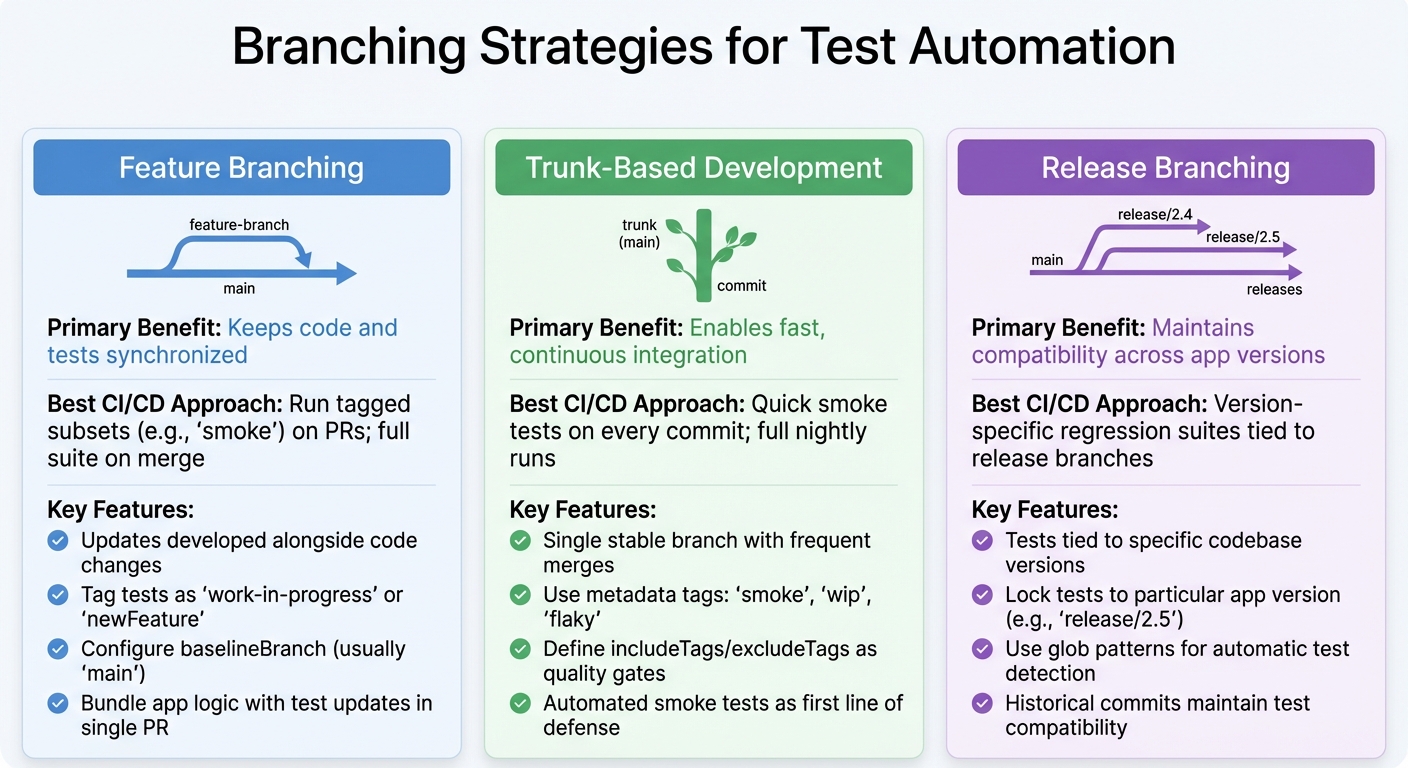
Branching Strategies for Test Automation: Feature, Trunk-Based, and Release Comparison
After establishing organized repositories and clear naming conventions, branching strategies become the next step in keeping your test automation in sync with your application code. These strategies ensure your test suite evolves alongside your codebase, avoiding disruptions caused by unstable tests. By integrating these methods with repository organization, you can create a smooth and efficient workflow for test automation. Below are three approaches that strike a balance between collaboration, stability, and speed.
Feature Branching for Test Development
Feature branching ensures that updates to tests are developed alongside code changes. This prevents new features from being merged without the necessary automation to validate them. When developers create feature branches, test files align with code changes, maintaining version consistency.
"Feature branches can bundle app logic modifications with corresponding test updates in a single pull request" – Maestro Docs
For Maestro users, this means adding new .yaml flows to the same branch as the feature code. To avoid disrupting the main suite, tag these tests with identifiers like work-in-progress or newFeature until they are verified. Additionally, configure your config.yaml to define a baselineBranch - usually main - so your CI/CD pipeline can compare test results between the feature branch and the stable branch. This method ensures that every feature is validated before merging. If rapid integration is your priority, trunk-based development offers another effective option.
Trunk-Based Development Approach
Trunk-based development revolves around a single, stable branch with frequent merges. Metadata tags (e.g., smoke, wip, flaky) help manage test execution during different phases. For instance, you can run only smoke tests on pull requests for quick feedback, while the full suite is reserved for nightly runs on the main branch.
To maintain consistency, define includeTags and excludeTags in your global config.yaml as quality gates. This setup ensures that experimental or unstable tests don’t interfere with the main branch’s stability. Since trunk-based development moves at a fast pace, automated smoke tests act as the first line of defense, ensuring the branch remains stable with every commit. For teams managing multiple app versions, release branching provides a more structured approach.
Release Branching for Version-Specific Tests
Release branching is ideal for maintaining test suites across multiple app versions. It ensures that tests are tied to the specific version of the codebase they validate, allowing historical commits to be tested accurately.
In a monorepo setup, release branches lock tests to a particular app version. For example, creating a branch like release/2.5 enables regression testing for that version. Using glob patterns (e.g., tests/**) in your CI configuration ensures that all test subdirectories are automatically detected, no matter which branch you’re working on.
| Strategy | Primary Benefit | Best CI/CD Approach |
|---|---|---|
| Feature Branching | Keeps code and tests synchronized | Run tagged subsets (e.g., smoke) on PRs; full suite on merge |
| Trunk-Based Development | Enables fast, continuous integration | Quick smoke tests on every commit; full nightly runs |
| Release Branching | Maintains compatibility across app versions | Version-specific regression suites tied to release branches |
Commit Practices and Code Review for Test Automation
When repositories are well-organized and branching strategies are in place, the next step to ensuring a reliable test automation framework is adopting disciplined commit practices and thorough code reviews. These practices prevent unstable tests from slipping into production and help maintain a manageable and scalable automation suite. By treating test code with the same care as application code, you can avoid creating a maintenance headache down the road.
Writing Clear and Specific Commit Messages
A good commit message should explain what was changed and why. Avoid vague descriptions like "Updated login test." Instead, opt for something like, "Add validation for invalid credentials in login flow", which provides context for both reviewers and future maintainers. Whenever possible, group application logic changes with their corresponding test updates into a single commit or pull request. This ensures the codebase and test suite remain aligned.
Incorporate test tags like smokeTest, util, or production_ready in your commit descriptions to clarify how the changes impact the CI/CD pipeline. For instance, a commit message like "Add checkout journey test (tagged as smokeTest for PR runs)" immediately informs the team about the test's purpose. If working with Maestro flows, specify whether the change pertains to a User Journey (e.g., an e-commerce funnel) or a Feature Test (e.g., specific component interactions). This level of detail helps reviewers quickly grasp the intent behind the updates.
Implementing Peer Review for Test Code
Peer reviews are essential for catching bugs, logic errors, and style issues before they reach the main branch. They also help enforce atomic commits - small, focused changes that make it easier to identify errors and track the evolution of the code. Regular reviews lead to better documentation, which can boost developer productivity by as much as 55%.
Train reviewers to watch for sensitive data, such as hardcoded credentials or API keys, which should never be included in version control. This extra layer of scrutiny ensures your test code remains secure and maintains high-quality standards.
Using Pull Request Workflows for Test Automation
Pull request workflows combine automated testing and human oversight to safeguard test automation quality. For example, you can configure a subset of automated tests - like smoke tests tagged with pull-request - to run on every PR. This approach provides quick feedback without the overhead of running the entire test suite.
Establish a baseline branch (often main) to compare PR test results against stable versions. Additionally, use global configurations to exclude tests tagged as flaky from PR builds, avoiding unnecessary roadblocks caused by known issues.
To ensure consistency, configure PR workflows to automatically detect and include new test files. For Maestro users, tag utility or nested flows as util and exclude them from standalone execution in PR workflows. This prevents redundant or broken test runs. Finally, ensure all test flows can execute on a completely reset device, which guarantees test isolation and reliability during parallel PR runs.
Integrating Version Control with CI/CD for Automated Testing
By combining disciplined commit practices with peer reviews, you can seamlessly connect version control to your CI/CD pipeline. This setup automates test execution whenever code changes, delivering fast feedback and catching regressions before they reach production.
Triggering Automated Tests on Commits and Pull Requests
Set up your pipeline to trigger specific tests for pull requests and run the complete test suite on merges or during nightly builds. Using tag-based filtering makes this process more efficient - you can label certain flows as smoke or registration and configure the pipeline to execute only those tagged tests during pull request builds. This approach ensures quick feedback without overwhelming the system.
A monorepo strategy can make this even easier by keeping test suites alongside the application’s source code. This setup ensures that tests are always in sync with the code they validate. It also allows feature branches to include both code changes and their corresponding test updates in a single pull request. For teams using Maestro, a central configuration file (like config.yaml) can define rules such as includeTags or excludeTags, acting as quality gates. For instance, you can exclude known flaky tests to prevent them from blocking builds.
Cloud-based testing platforms often use a baselineBranch setting (commonly set to main) to compare test results during pull requests. This comparison highlights any new failures caused by recent code changes, making it easier to spot and address issues early.
The next step is to manage dependencies effectively and ensure test versions remain aligned with your codebase.
Managing Test Dependencies and Version Pinning
Once your commits are structured and repositories are organized, managing test dependencies becomes crucial for consistent execution. Treating test dependencies with the same care as production code ensures reliability. A centralized configuration file - like a root-level config.yaml - can serve as the single source of truth for your CI/CD pipeline. This file can define global settings, specify test discovery paths, and outline execution policies. Using glob patterns (e.g., flows: "tests/**") provides precise control over which test artifacts are executed.
For teams working in multiple environments, you can create separate configuration files (e.g., staging-config.yaml) to tailor the pipeline to specific environments. This allows you to include or exclude tests based on the unique requirements of each environment.
"Tests remain coupled to the codebase version they validate, ensuring historical commits maintain test compatibility" – Maestro Docs
Designing test flows for parallel execution can significantly speed up your CI/CD pipeline. Break tests into small, independent scenarios that validate a single user action. As Leland Takamine, Founder of Mobile.dev, puts it: "A Flow should test a single user scenario." This modular approach allows tests to run in parallel, cutting down execution time. Reserve sequential execution for complex scenarios that require strict ordering, using an executionOrder object in your configuration for those rare cases.
While efficient test execution is critical, handling failures effectively is just as important.
Handling Test Failures in CI/CD Pipelines
When tests fail in your CI/CD pipeline, it’s essential to provide clear diagnostics to resolve issues quickly. Configure your pipeline to generate JUnit (XML) reports for structured analysis and HTML reports that include failure screenshots or videos for detailed debugging. These artifacts are especially helpful when investigating intermittent or environment-specific problems.
Set up automated notifications, such as email or Slack alerts, to ensure timely responses to test failures. For critical test flows, you can use settings like continueOnFailure: false to halt the pipeline immediately if a key test (like a login flow) fails. This prevents wasted resources on subsequent steps.
Audit logs and detailed failure reports make it easier to trace issues back to their source. If a failure blocks a merge, classify it as either a regression or a flaky test. Flaky tests should be tagged and excluded from blocking builds, while genuine issues need to be addressed by the PR author. Never merge broken tests just to move forward - fix the root cause or update the test to reflect intentional changes in behavior. This ensures your CI/CD pipeline remains a reliable safety net for your codebase.
Conclusion
Version control is more than just a technical necessity for test automation - it’s the backbone of a scalable and dependable testing system. By storing test suites alongside application code within a monorepo, you create a streamlined process where every feature change is paired with its corresponding test update in the same pull request. This approach ensures no feature goes untested and keeps your test suite perfectly aligned with the codebase it validates.
Building a robust automation system requires careful planning. Structuring your repository to reflect your application’s architecture - whether it’s based on user journeys for goal-oriented apps or by features for habit-driven apps - fosters what Maestro documentation refers to as "structural isomorphism." This alignment not only simplifies maintenance but also helps your test suite adapt as the application evolves. Additionally, breaking tests into small, independent flows that target specific user scenarios enables parallel execution in CI/CD pipelines, which becomes increasingly important as your project grows.
Tagging quality gates offers precise control without adding clutter to your repository. Using a global configuration file, you can exclude tests marked as flaky or experimental from production pipelines, maintaining reliability while keeping those tests available for future refinement. Environment-specific configurations further enhance this setup, allowing lightweight smoke tests to run on every pull request while reserving full test suites for nightly builds.
As Leland Takamine, Co-founder & CEO of mobile.dev, puts it: "Advancements in AI and tooling have unlocked unprecedented speed, shifting the bottleneck from development velocity to quality control." By implementing effective version control practices, your test automation can keep up with this rapid pace, delivering fast feedback without compromising reliability. From organizing folders to integrating with CI/CD pipelines, the strategies in this guide lay the groundwork for a testing system that grows with your team and evolves alongside your application.